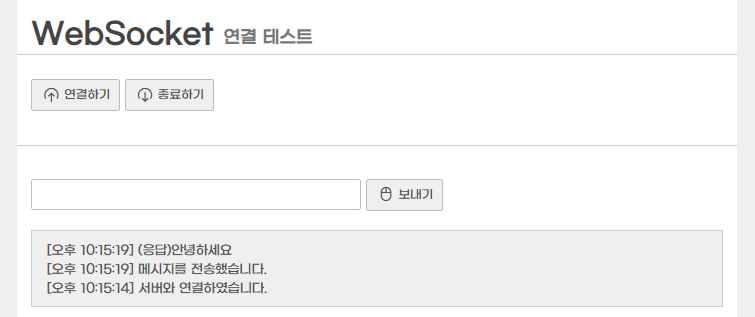
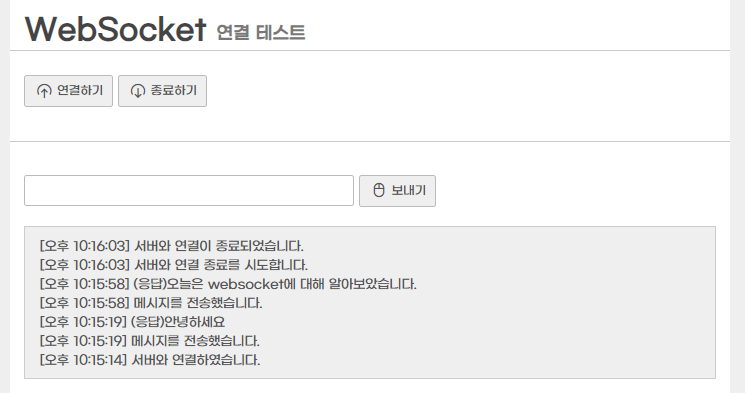
WebSocket은 웹상에서 동작하는 Socket으로, 기존의 웹 통신 방식과는 다르게양방향 통신을 지원한다.
Ajax와 유사한 면이 있지만 Ajax는 단방향 통신에 주로 사용되며, WebSocket은 웹 페이지에서 서버로부터 데이터를 받는 것뿐만 아니라, 웹 페이지에서 서버로 데이터를 보내는 양방향 통신이 가능하다. 이를 통해 다양한 실시간 데이터를 웹 애플리케이션에 적용할 수 있다.
WebSocket은기존의 웹 통신 방식보다 빠르고 효율적이며,실시간 기능을 제공하기 위해 널리 사용되고 있다.
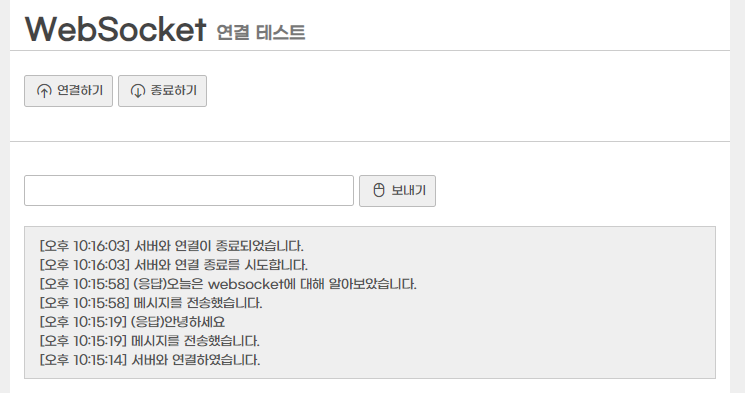
WebSocket은 웹상에서 동작하는 Socket으로, 기존의 웹 통신 방식과는 다르게양방향 통신을 지원한다.
Ajax와 유사한 면이 있지만 Ajax는 단방향 통신에 주로 사용되며, WebSocket은 웹 페이지에서 서버로부터 데이터를 받는 것뿐만 아니라, 웹 페이지에서 서버로 데이터를 보내는 양방향 통신이 가능하다. 이를 통해 다양한 실시간 데이터를 웹 애플리케이션에 적용할 수 있다.
WebSocket은기존의 웹 통신 방식보다 빠르고 효율적이며,실시간 기능을 제공하기 위해 널리 사용되고 있다.
collection: 넘어온 파라미터의 반복하기 원하는 파라미터를 입력하여 주면 된다. 예를 들어 vo의 testMap이라는 Map이 있다면 collection에 testMap을 넣어주면 된다.
item: List의 경우 순차적으로 반복하여 값이 저장된다. item을 data라고 하였을 경우 WHERE col = #{data} 이런식으로 사용이 가능하다. Map에서는 key의 value가 저장된다.
separator: 반복 되는 사이에 출력 할 문자열
open: 해당 구문이 시작될때 삽입되는 문자열
close: 해당 구문이 종료될때 삽입되는 문자열
index: List의 경우 index 번호,Map의 경우 key 값이 저장된다.
<foreach collection="Map or List or Array" item="alias" ></foreach>
Map 안에 Map (or Value Object)
public class TestVO {
	private String name;
	private Map<String, String> infoObj;
}
TestVO에 다음과 같은 구조의 데이터가 들어있다고 가정할 때, NAME, AGE와 COLOR 컬럼 데이터를 INSERT 해야한다.
{
	name: "haenny",
	info: {
		// key : value = age : color
		// 나이에 좋아했던 색상
		14 : "pink",
		15 : "yellow",
		20 : "blue"
	}
}
List 형태의 경우 TestVO를 foreach 돌려서 사용하면되지만, Map의 경우Key와 Value 값을 가져올 수 있나? List이거나 Array가 아니기 때문에 foreach 문법을 사용할 수 없는 거 아닌가? 생각할 수 있다.
<select id="insInfo" parameterType="testVO">
	INSERT INTO TEST_TBL (
		NAME,
		AGE,
		COLOR
	)
	<foreach collection="info" item="value" index="key" separator="" open="" close="">
		SELECT #{name} AS NAME,		// TEST VO에서 바로 가져온 값
			#{key} AS AGE,		// info 라는 collection (Map) 의 Key 값
			#{value} AS COLOR	// info 라는 collection (Map) 의 Value 값
	  	FROM DUAL
	</foreach>
</select>
INDEX 를 List나 Array의 반복되는 구문 형태로만 사용된다고 생각할 수 있지만, Map의 경우 Key 값이 저장된다.
Map 안에 List
<select id="getTest" parameterType="testVO2" resultType="java.util.list">
	SELECT TEST
	FROM TEST_TBL
	WHERE
    <foreach collection="mapData" item="value" index="key" separator="AND">
    	#{key} IN
        // mapData = {key : value} 형태인데 value 값이 List 형태인 경우이다
        <foreach collection="value" item="item" index="idx" separator="or"  open="(" close=")">
        	#{item}
        </foreach>
    </foreach>
</select>
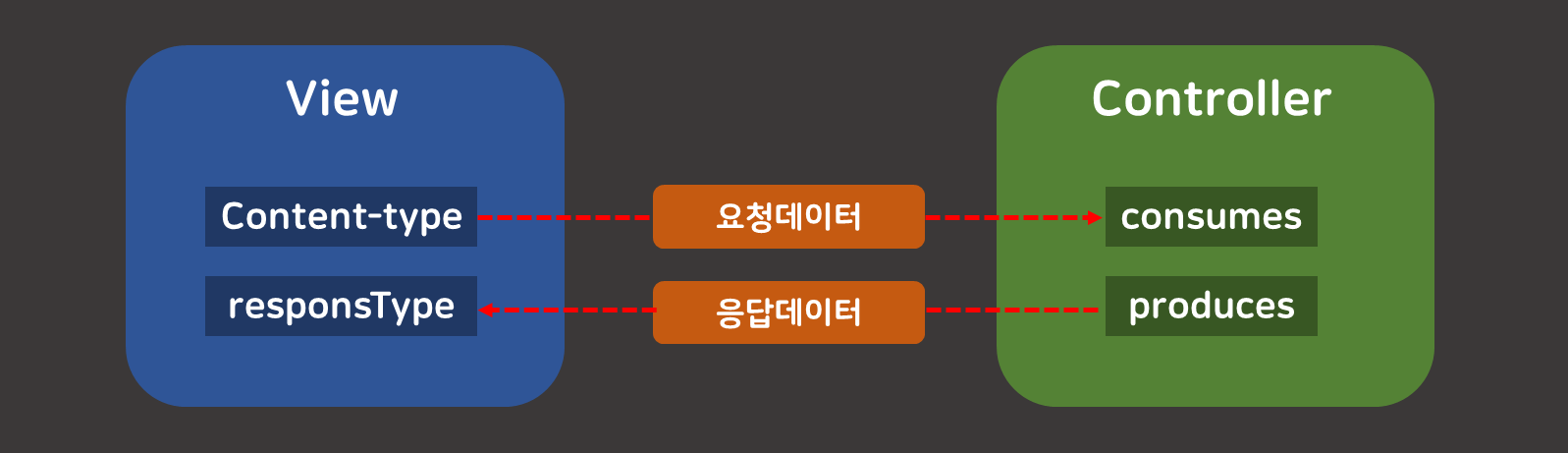
한번쯤 만나봤을 이 골치아픈 415는 클라이언트(View)와 서버(Controller)의 요청/응답하는 데이터의 매개변수 설정이 잘못되었을 때 주로 발생한다.
오늘 해결방법으로 두 가지를 모두 살펴볼 것이다.
헤더 타입 설정
RequestBody 설정
이 포스팅은 쿠팡 파트너스 활동의 일환으로, 이에 따른 일정액의 수수료를 제공받습니다.
추천인 코드 : AF8800551
HTTP Request, Content-Type 헤더와 Accept 헤더 확인하기
Content-Type헤더와Consumes설정
@RequestMapping의consumes설정과Content-Typerequest 헤더가 일치할 경우에 URL이 호출된다.
Content-Type은 HTTP 메시지(요청과 응답 모두)에 담겨 보내는 데이터 형식을 알려주는 헤더이다. 대부분의 브라우저와 웹서버는 HTTP 표준 스펙을 따르는 Content-Type 헤더를 기준으로 HTTP 메시지에 담긴 데이터를 분석·파싱한다. 그러나 HTTP 요청의 경우 GET방식인 경우는 무조건 URL 끝에 쿼리스트링(key=value) 형식이기 때문에 Content-Type 헤더가 굳이 필요없다. 따라서 Content-Type은 POST방식이나 PUT방식처럼 BODY에 데이터를 싣어 보낼 때 중요하다.
@RequestMapping의produces설정과Acceptrequest 헤더가 일치할 경우에 URL이 호출된다.
브라우저(클라이언트)에서 웹서버로 요청 시 요청 메시지에 담기는 헤더이다. Accept 헤더는 자신에게 이러한 데이터 타입만 허용하겠다는 뜻으로, 브라우저가 요청 메시지의 Accept 헤더 값을 application/json 이라고 설정했다면 웹 서버에게 나는 json 데이터만 처리할 수 있으니, json 데이터 형식으로 응답을 돌려줘라고 말하는 것과 같다.
DELETE FROM KTF_COMPARE_RESULT
WHERE (TIMESTAMP_ACCIDENT = '1565059999' AND VIN = 'VINVINVIN1')
   OR (TIMESTAMP_ACCIDENT = '1565059999' AND VIN = 'VINVINVIN2')
만약 리스트 내 인자값의 따라 조건을 동적으로 주고 싶다면, 아래와 같이 foreach문 내에 if태그를 활용하면 된다.
<delete id="delCompareResult" parameterType="java.util.List">
    DELETE FROM KTF_COMPARE_RESULT
    <where>
    <foreach collection="list" item="item" open="" close="" separator="OR">
       <if test='item.dataGb==null or "".equals(item.dataGb)'>
           (TIMESTAMP_ACCIDENT = #{item.timestampAccident} AND VIN = #{item.vin})
       </if>
       <if test='item.dataGb!=null and !"".equals(item.dataGb)'>
          (TIMESTAMP_ACCIDENT = #{item.timestampAccident} AND IDX = #{item.dataGb})
       </if>
    </foreach>
    </where>
</delete>
MERGE 문
<insert id="insCoapLog" parameterType="java.util.List" >
    MERGE INTO KTF_COMPARE_RESULT R1
        USING (
            <foreach  collection="list" item="item" open="" close="" separator="union">
                SELECT #{item.timestampAccident} AS timestampAccident
                     , #{item.vin} AS vin
                     , #{item.objGb} AS idx
                     , #{item.dataGb} AS dataGb
                 FROM SYS.DUAL
            </foreach>
        ) T1
            ON (R1.TIMESTAMP_ACCIDENT = T1.timestampAccident)
        WHEN MATCHED THEN
            UPDATE
            <set>
                  R1.VIN= T1.vin
                , R1.IDX= T1.idx
                , R1.DATA_GB= T1.dataGb
            </set>
        WHEN NOT MATCHED THEN
            INSERT
            <trim prefix="(" suffix=")" suffixOverrides="," >
                  TIMESTAMP_ACCIDENT
                , VIN
                , IDX
                , DATA_GB
            </trim>
            <trim  prefix="values (" suffix=")" suffixOverrides=",">
                  T1.timestampAccident
                , T1.vin
                , T1.idx
                , T1.dataGb
            </trim>
</insert>
Line5-10. 위의 MERGE문에서의 foreach는 list 파라미터를 가져와서 MERGE문에 사용할 테이블을 먼저 만들었다.
Line12. ON 조건에는 테이블의 키 값인 TIMESTAMP_ACCIDENT를 넣어주었고,
Line13-19. 키 값이 매칭되는 데이터가 있다면 나머지 컬럼의 데이터를 UPDATE 해준다. * 이 때, ON 에 넣어준 컬럼을 UPDATE에 넣어주면 에러가 난다.
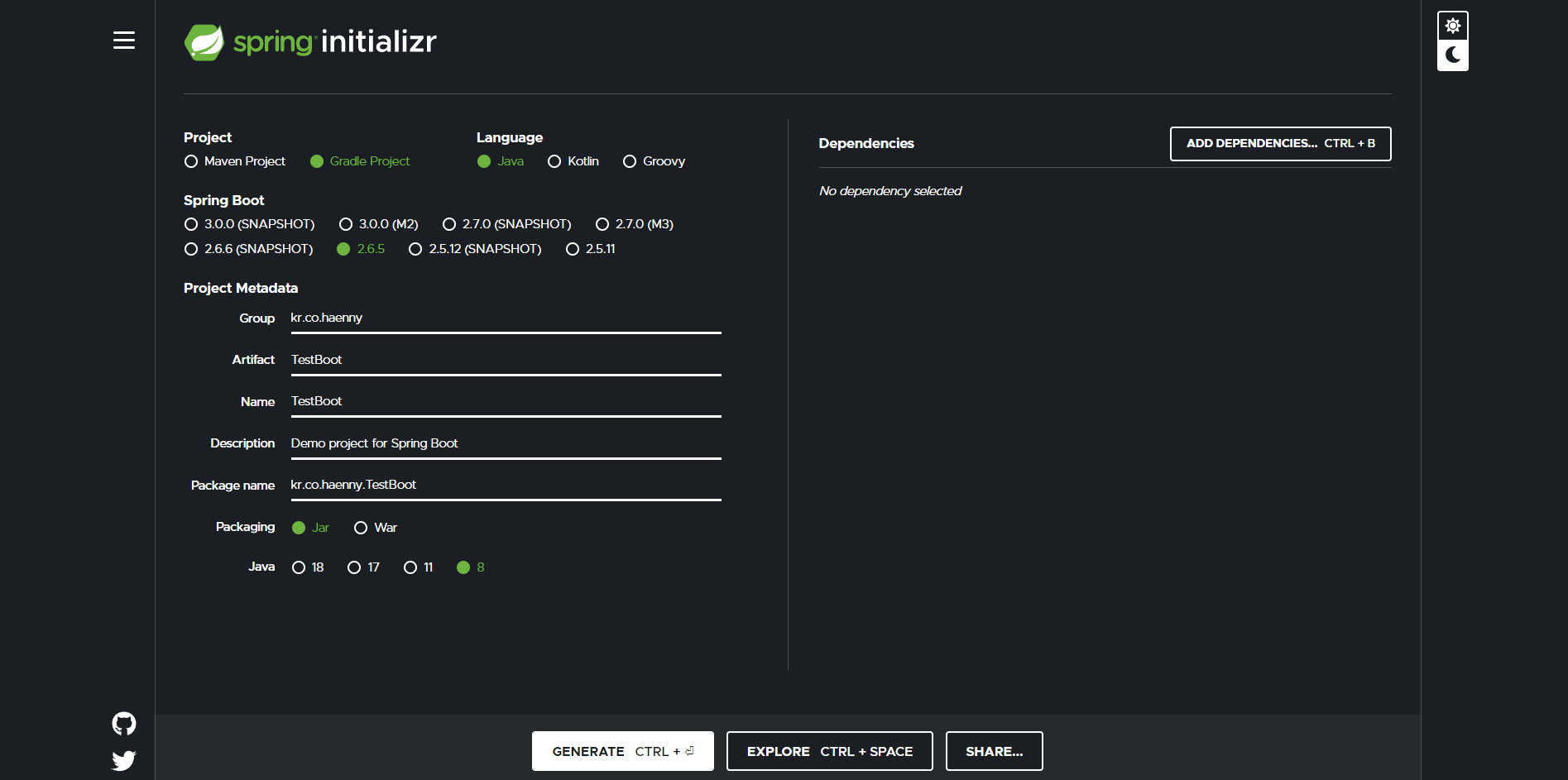
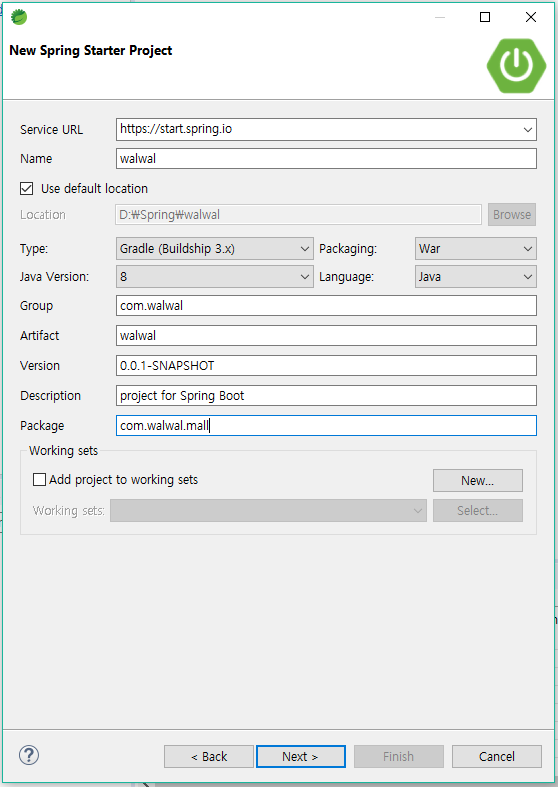
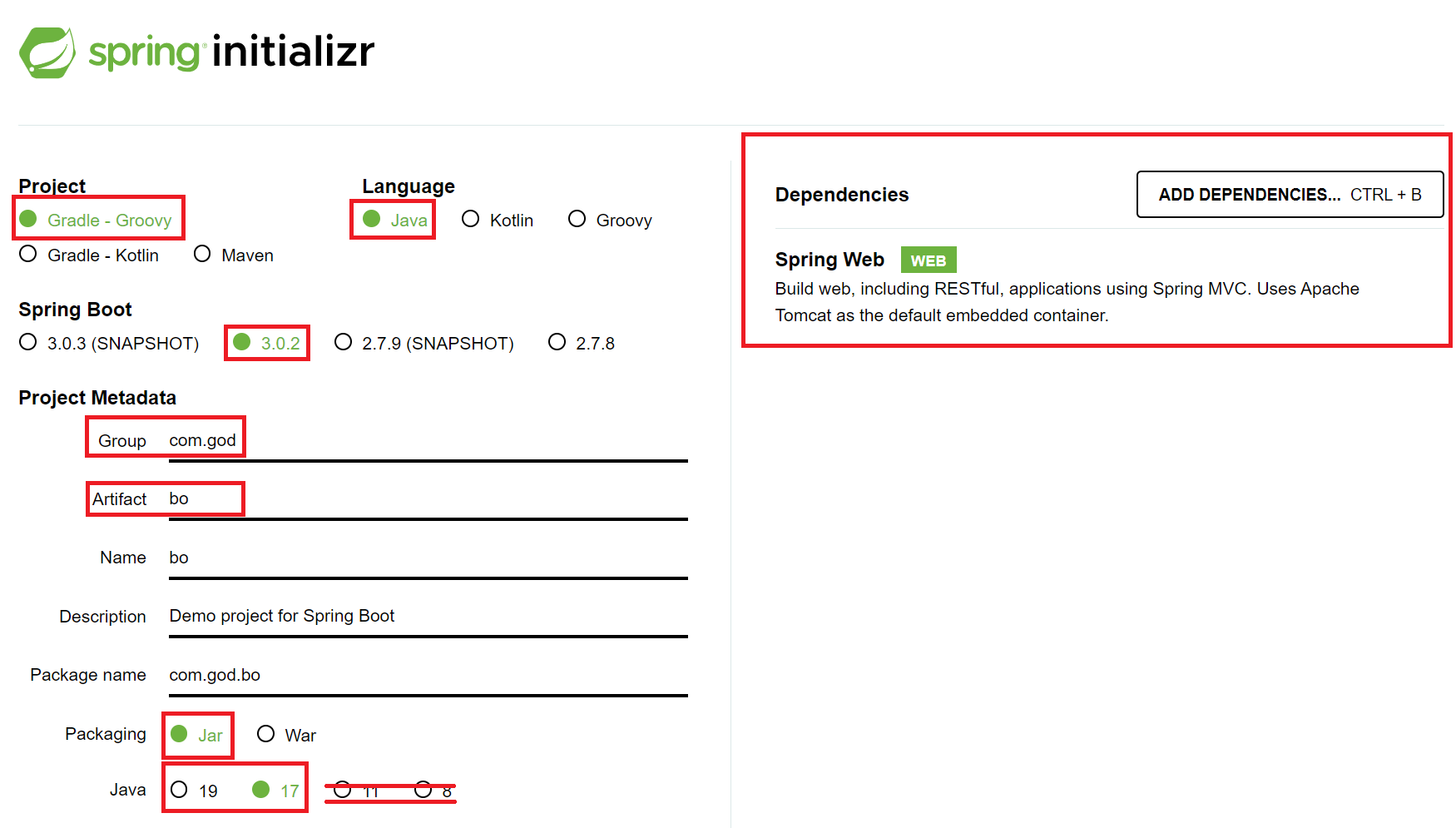
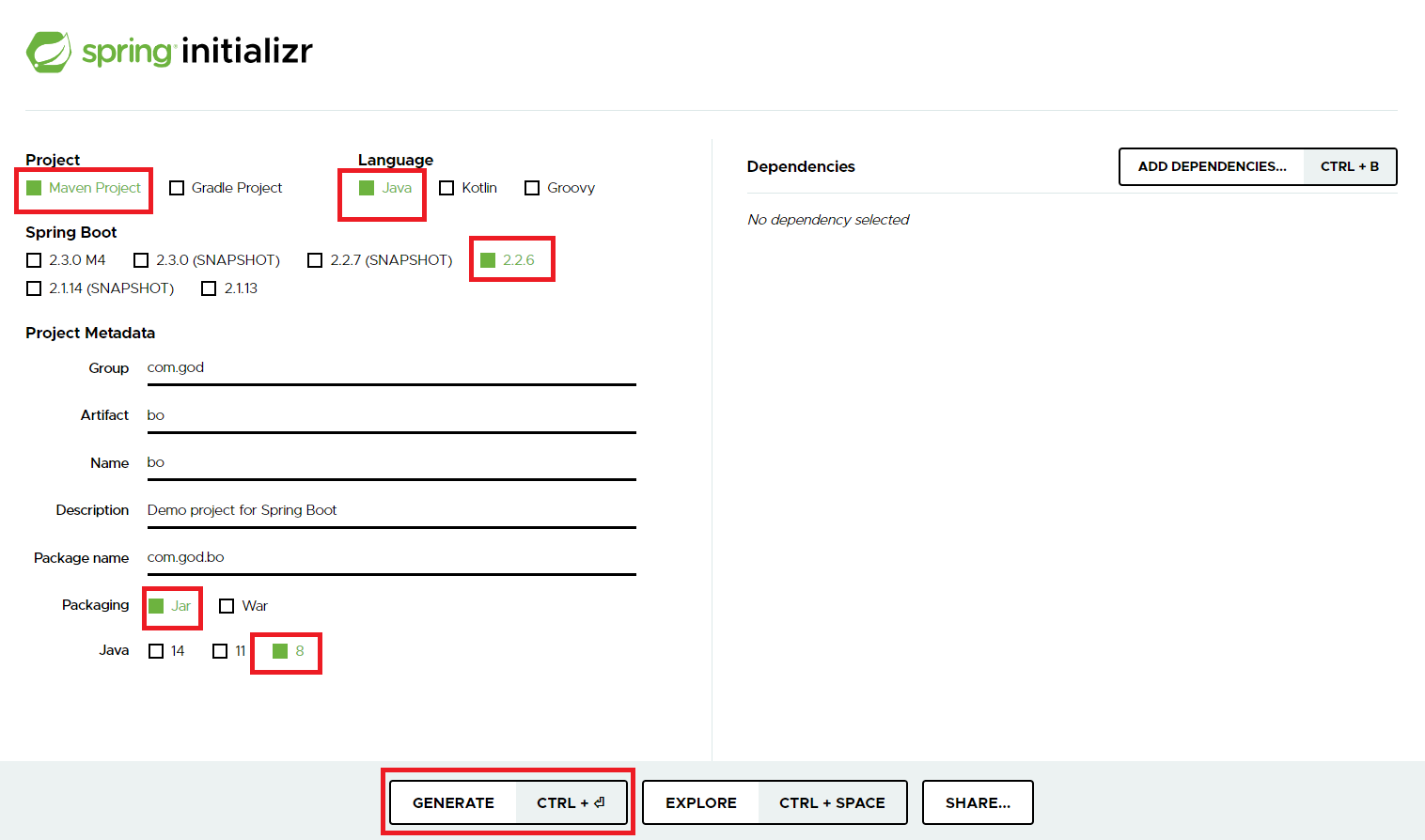
본인이 만드려는 프로젝트명과 그룹명을 설정하고 스펙에 맞게 입력 후Generate CTRL + Enter버튼을 클릭하면 압축(Zip) 파일이 다운로드 될 것이다.
다운받은 압축파일은 본인의 이클립스workspace경로에 옮긴 뒤에"여기에 압축풀기"를 클릭하여 압축을 풀어야 프로젝트 임포트할 때 편리하다.
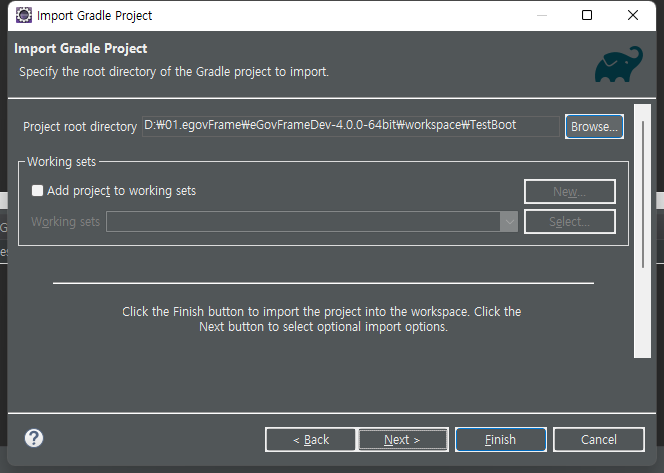
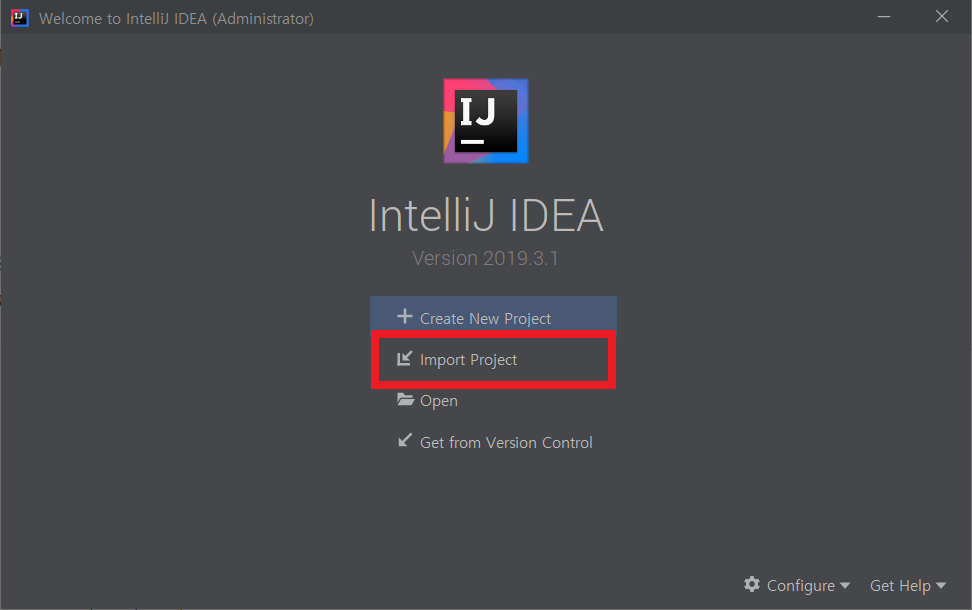
다시 이클립스로 돌아와서 Package Explorer 창에서마우스 우키 - Import - Gradle - Existing Gradle Project 클릭하고,
다음 화면에서 Browser 를 선택하여 이전에 압축해제한 파일을 선택한 뒤 Finish를 클릭한다.
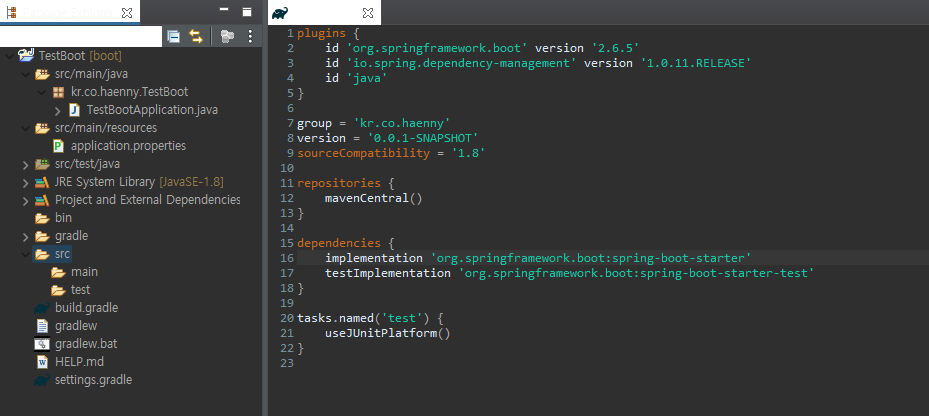
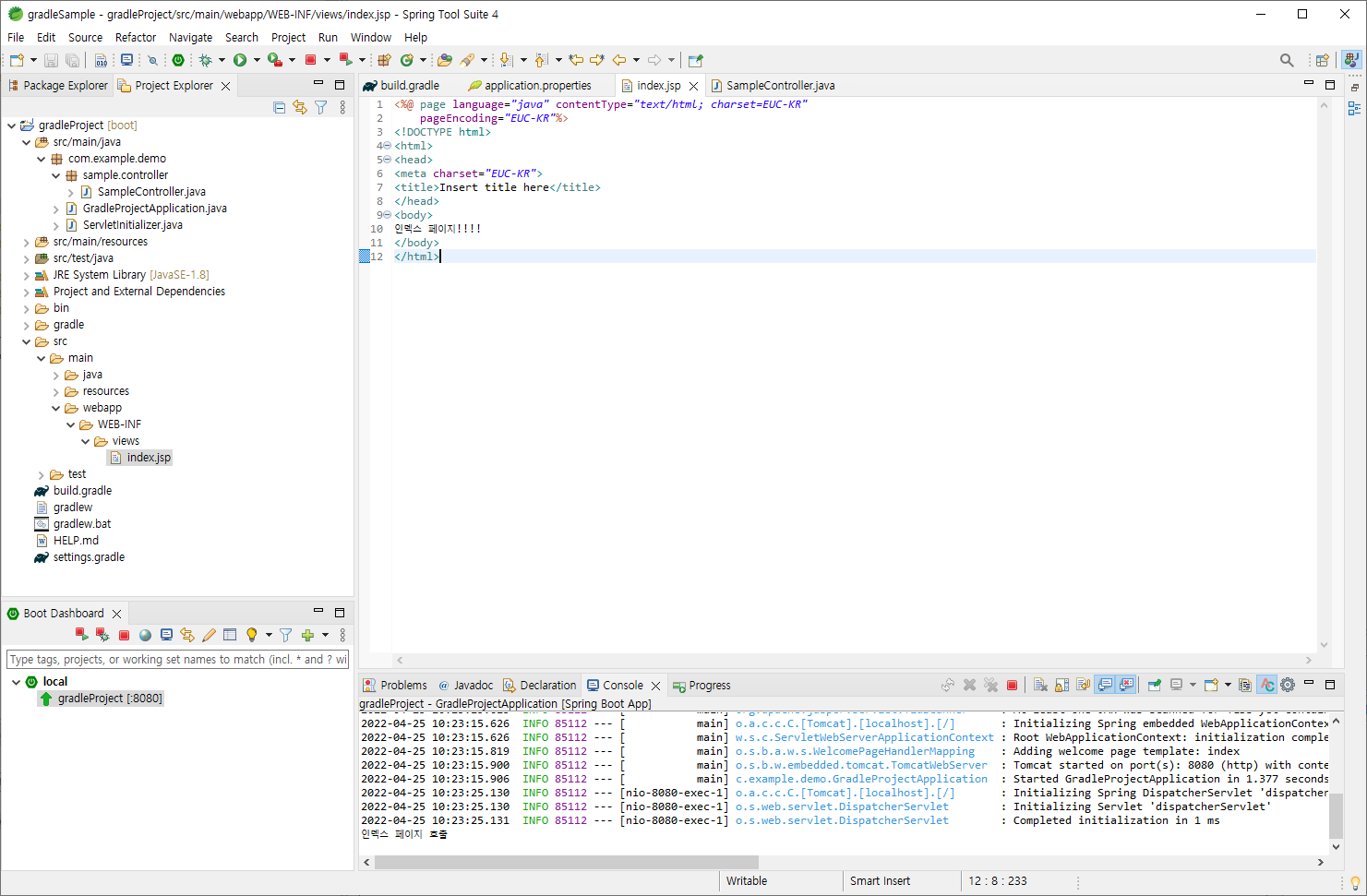
그러면 다음과 같은 구조로 프로젝트가 생성된다 !
Dependency 추가하기
주로 SpringMVC 구조의 프로젝트를 진행하면서 자주 사용해왔던 라이브러리를 위주로 추가할 것이다.
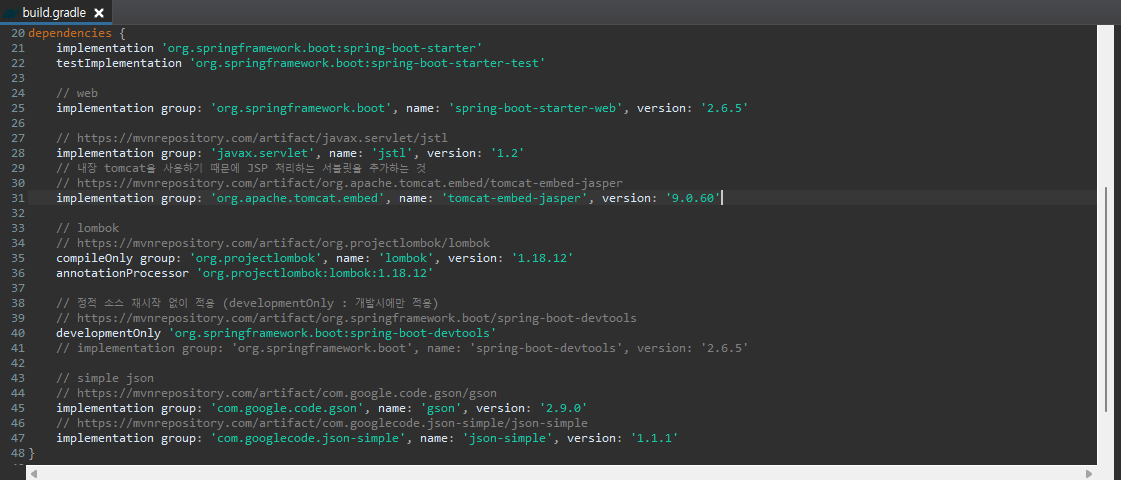
버전에 따라 필요한 라이브러리는Maven Repository에서 검색한 뒤 알맞은 버전을 선택해서 build.gradledependencies에 추가해주면 된다.
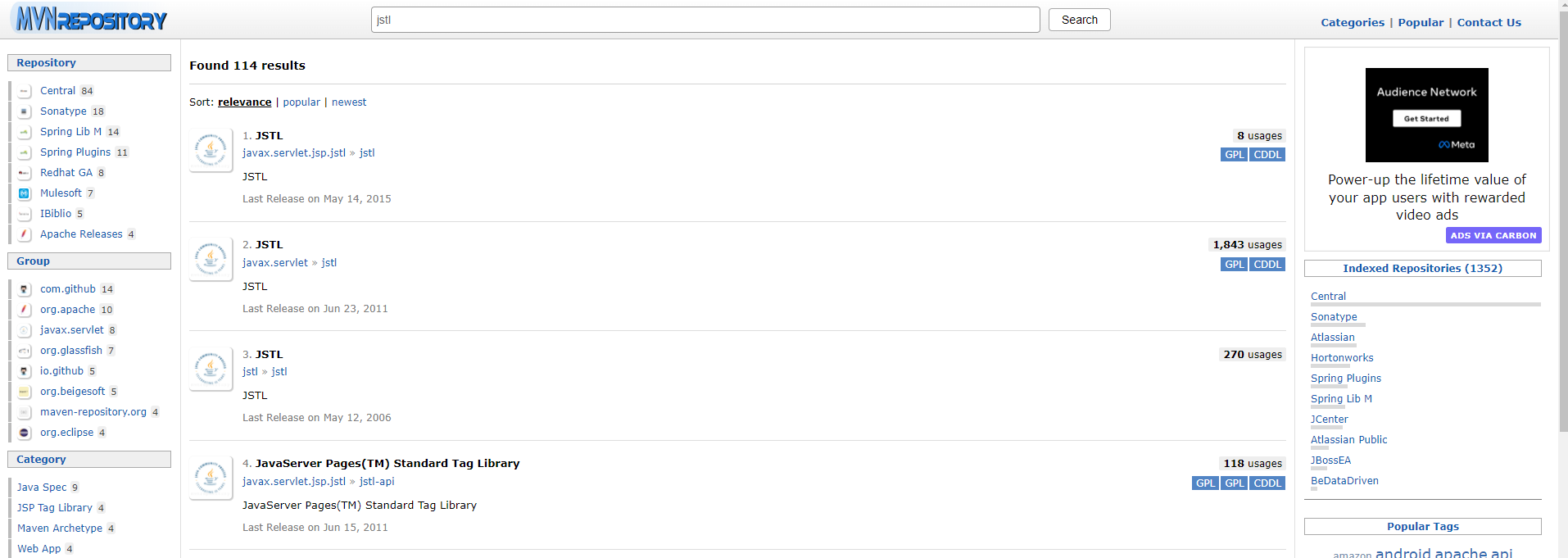
만약jstl를 추가할 때 여러개가 나와서 헷갈릴 수 있다.
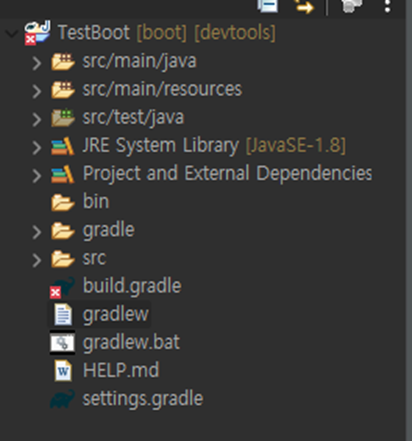
첫 번째 것으로 추가를 하고Gradle - Refresh Gradle Project를 클릭하면, build.gradle 파일에 빨간 X 표시가 되어 정상적으로 추가되지 않을 것이다.
javax.servlet.jsp.jstl 로 추가했을 때 build.gradle 에러
두 번째 JSTL인(javax.servlet.jstl)로 받아야한다.
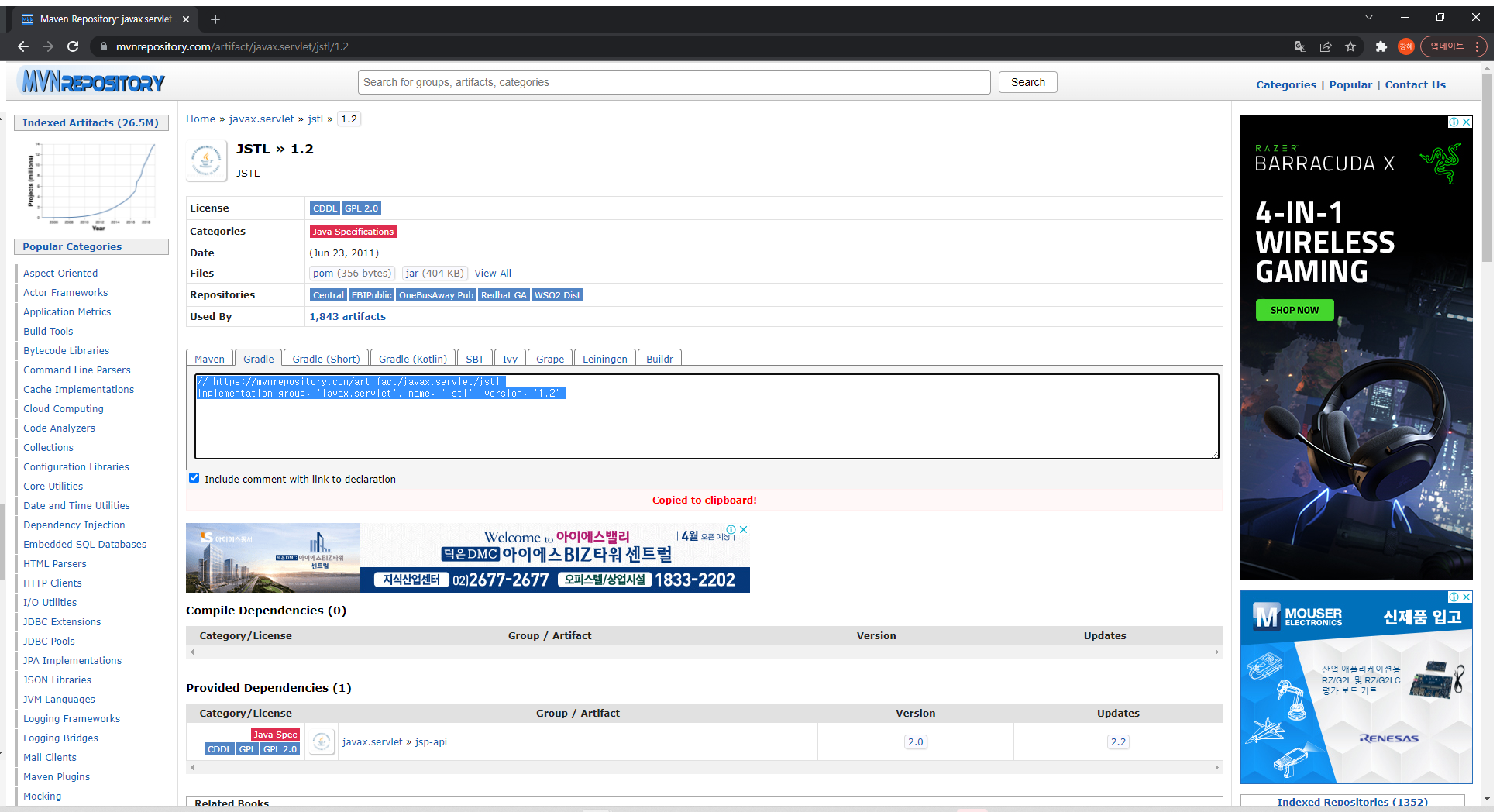
필자는 가장 최신 버전인 1.2 버전을 클릭하였고,Gradle Tab의 implementation group 정보를 그대로 복사하여 build.gradle 에 추가해주면 된다.만약 지금 게시물과는 번외로, Maven Project 인 경우에는 Maven Tab을 클릭하여 추가해주면 된다.
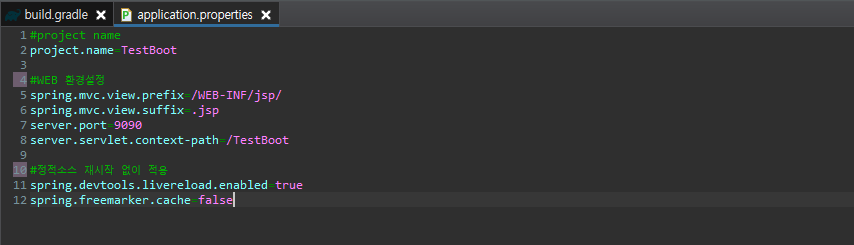
아직은 데이터베이스 커넥션 없이 프로젝트를 사용을 할 것이기 때문에, 웹프로젝트 특성에 맞는 일부 설정만 하였다.
#project name
project.name=TestBoot

#WEB 환경설정
spring.mvc.view.prefix=/WEB-INF/jsp/
spring.mvc.view.suffix=.jsp
server.port=9090
server.servlet.context-path=/TestBoot

#정적소스 재시작 없이 적용
spring.devtools.livereload.enabled=true
spring.freemarker.cache=false
SpringBoot "Path with "WEB-INF" or "META_INF" : [WEB-INF/jsp/main.jsp]" 경고 및 Whitelabel Error Page 오류 Failed to determine a suitable driver class 오류 해결 SpringBoot 2.5 → 2.6 업그레이드 시No more pattern data allowed after {*...} or ** pattern element 오류 해결 SpringBoot Initializing Spring DispatcherServlet 'dispatcherServlet' [SpringBoot] 스프링부트 properties 설정파일 분리하기
Loading class `com.mysql.jdbc.Driver'. This is deprecated. The new driver class is `com.mysql.cj.jdbc.Driver'. The driver is automatically registered via the SPI and manual loading of the driver class is generally unnecessary.
해결 방법 : com.mysql.jdbc.Driver-class-name 을 com.mysql.cj.jdbc.Driver 로 바꿔준다.
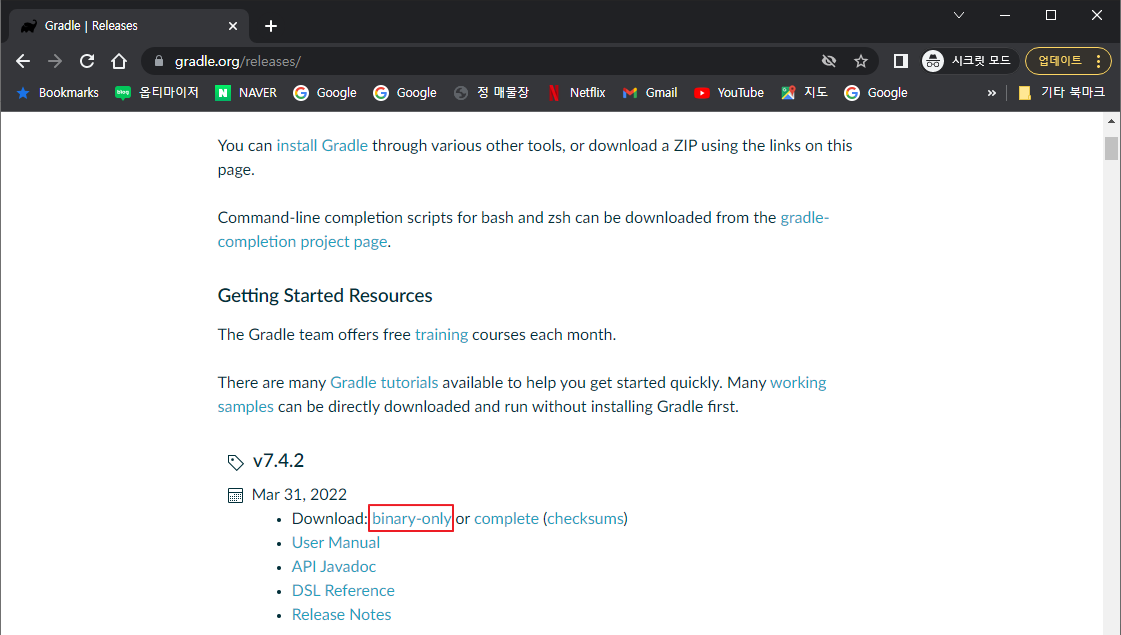
3) gradle-7.4.2-bin.zip 파일이 다운로는 되는데 해당 압축 파일을 원하는 폴더에 압축을 풀어준다.
2. STS gradle 연동
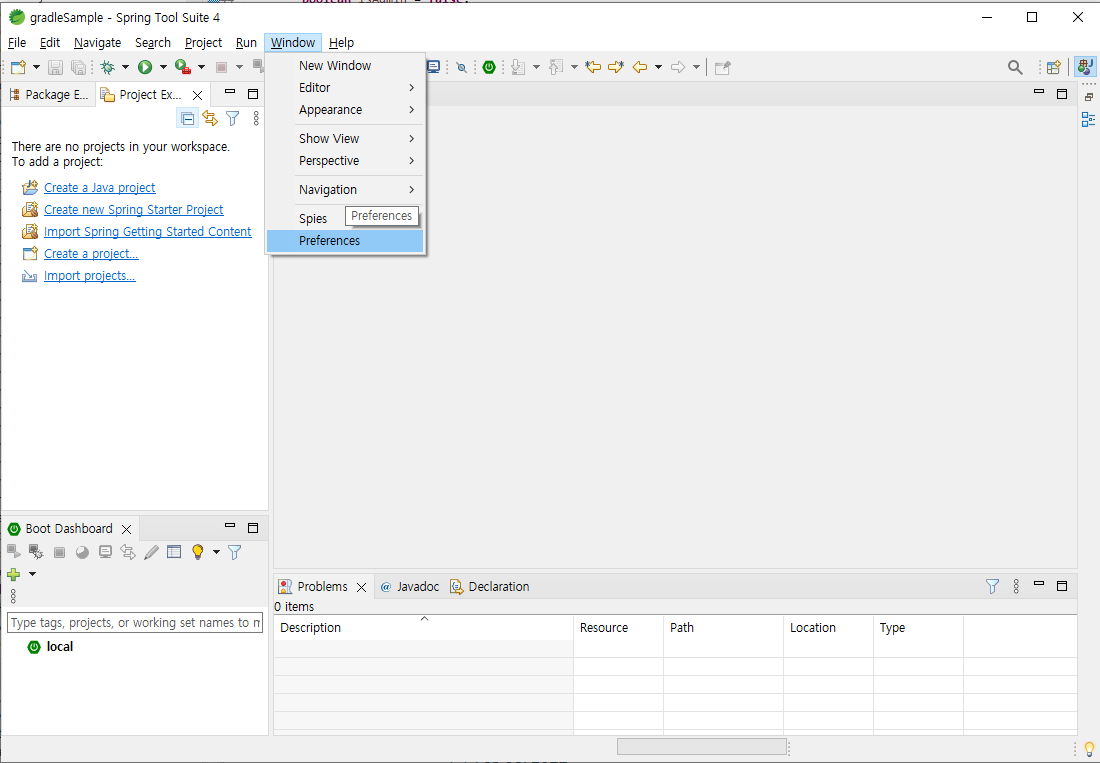
STS 를 실행 후 환경 설정에서 gradle 을 수동으로 설정해 준다.
1) STS 실행후 Window -> Preferences 창을 열어준다.
2) 좌측 메뉴에서 Gradle 을 선택, Local installation directory 에 gradle 을 수동 설치한 경로를 지정해 준다.
3. 프로젝트 생성
스프링 프로젝트를 생성한다.
1) Srping Starter Project 선택하여 스프링 프로젝트 생성을 진행한다.
2) Type : Gradle Project
Package : Jar 를 선택시 Java 관련 리소스만 패키징 되기때문에 War 를 선택
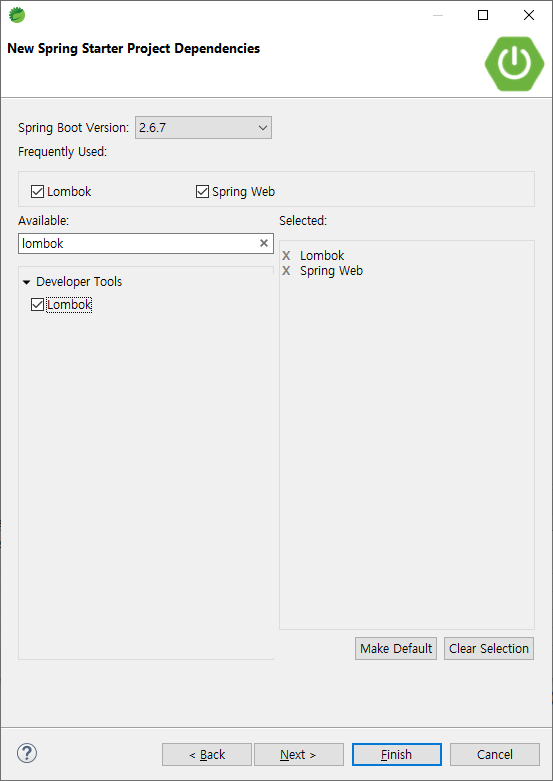
3) Dependencies 선택을 할 경우프로젝트 생성시최초 build.gradle 관련 라이브러리들이 자동으로 설정 된 상태로 프로젝트가 생성된다. 최초 Lombok 과 Spring Web 만 선택을 하고 필요한 라이브러리들은 추후 build.gradle 파일에서 추가하면 된다.
4. 인코딩 설정
프로젝트의 encoding 타입을 을 설정한다
1) 인코딩 타입을 UTF-8 로 설정하지 않으면 한글 입력이 되지 않을 수 있다. (EUC-KR 을 써도 됨)
5. 웹 화면 관련 설정
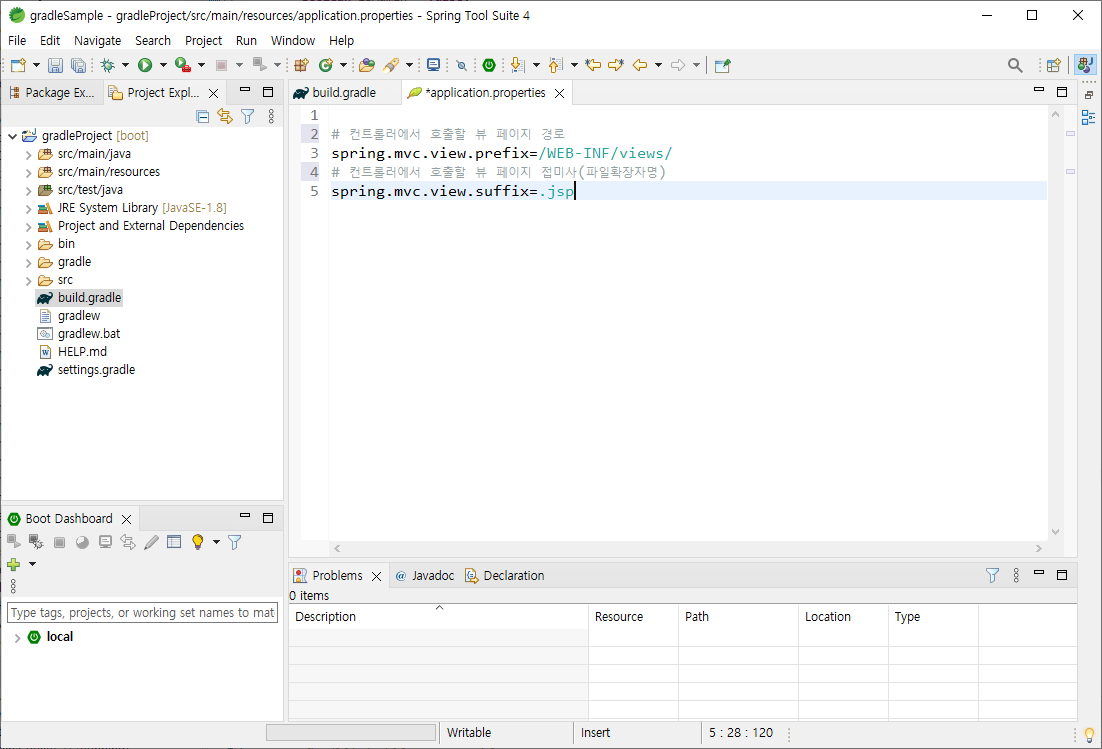
1) 프론트 단을 구성을 JSP 로 하기때문에 JSP 를 사용할 수 있는 라이브러리를 추가해 준다.
[스프링부트 (4)] Spring Boot DataBase 연동하기 (MariaDB, MyBatis, HikariCP)
by 갓대희2020. 2. 12.
[스프링부트 (4)] 스프링부트 DB 연동 (MariaDB, MyBatis, HikariCP)
안녕하세요. 갓대희 입니다. 이번 포스팅은 [ SpringBoot DB 연동] 입니다. : )
0. 들어가기 앞서
Spring Boot를 사용하면서 DB를연결하기 위해 JDBC Connection Pool이란걸 사용 해보셨을 것이다.
▶ 커넥션풀(Connection Pool)이란?
1) 정의
- 풀(Pool)속에 데이터베이스와의 연결(커넥션)들을 미리 만들어 두고 데이터베이스에 접근시 풀에 남아있는 커넥션중 하나를 받아와서 사용한뒤 반환하는 기법. - DataBase Connection Pool, DBCP라고도 한다.
2) 사용이유
- 웹 애플리케이션은 다수의 사용자가 데이터베이스에 접근해야 하는 상황에 사용자들이 요청할때마다 연결을 만들고 해제하는 과정을 진행하게되면 비효율적이다. 따라서 커넥션풀을 이용하여 미리 여러 연결을 만들어놓고 필요한 사용자가 요청시 미리 만들어놓은 연결을 주는 형식으로 효과적으로 DB연결 및 자원사용을 할 수 있다.
Spring Boot에 JDBC를 통해 mariadb(mysql) 연결해보자!
사실 특별한 설정이 필요하진 않다. 역시 스프링 부트 하다. Dependency와 application.properties에 간단한 설정만 하면 MyBatis 및 MariaDB 연결은 완료 된다. (1 ~ 2번) 앞서 포스팅한 MVC의 기본 개념들을 적용하여 화면에 출력하는 것 까지 간단한 예제로 정리해 보려 한다.
- 경로 : resources\mybatis\test\testMapper.xml - 주의 : 향후 생성할 mapper interface에 대한 풀패키지 경로가 필요하고, 각 쿼리문의 id값과 mapper interface의 메서드명과 일치 해야 한다.
ex)
<?xml version="1.0" encoding="UTF-8"?>
<!DOCTYPE mapper PUBLIC "-//mybatis.org//DTD Mapper 3.0//EN" "http://mybatis.org/dtd/mybatis-3-mapper.dtd">
<mapper namespace="com.god.bo.test.mapper.TestMapper">
    <select id="selectTest"  resultType="com.god.bo.test.vo.TestVo">
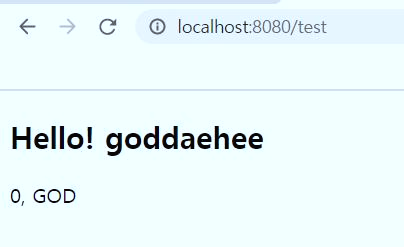
        SELECT 'GOD' AS NAME
    </select>
</mapper>
※ 여기서 간단한 설정을 통해 resultType에 계속 풀패키지를 명시하지 않도록 할 수 있다. 1) application.properties 추가
# mybatis 매핑 type을 짧게 쓰기 위한 설정
# mapper.xml에서 resultType을 지정할 때 com.god.bo.test.vo.TestVo 대신 TestVo로 간략히 할 수 있다.
mybatis.type-aliases-package=com.god.bo.test.vo
# mapper.xml 위치 지정
# **은 하위 폴더 레벨에 상관없이 모든 경로를 뜻하며, *는 아무 이름이나 와도 된다는것을 뜻합니다.
mybatis.mapper-locations=mybatis/**/*.xml
2) mapper.xml 에서 resultType에 클래스명만 명시
<select id="selectTest"  resultType="TestVo">
	SELECT 'GOD' AS NAME
</select>
4. Vo 클래스 생성(model, dto, vo)
- 경로 : com.god.bo.test.vo.TestVo - 데이터를 관리하는 클래스, 데이터를 View로 넘겨줄때 사용하는 객체. 흔히 관념적으로 모델이라고 하며 DTO, VO 라는 표현을 많이 쓴다.
ex)
package com.god.bo.test.vo;

public class TestVo {
    private String id;
    private String name;

    public String getId() {
        return id;
    }
    public void setId(String id) {
        this.id = id;
    }
    public String getName() {
        return name;
    }
    public void setName(String name) {
        this.name = name;
    }
}
5. Mapper 인터페이스 생성
- 경로 : com.god.bo.test.mapper.TestMapper - 주의 : mapper.xml의 mapper tag 안에 선언한 namespace 에 정확하게 일치하는 위치에 같은 이름으로 생성해야 한다. 그리고select tag안에 선언한id 값과 각 method 이름을 같게 생성해야 한다.
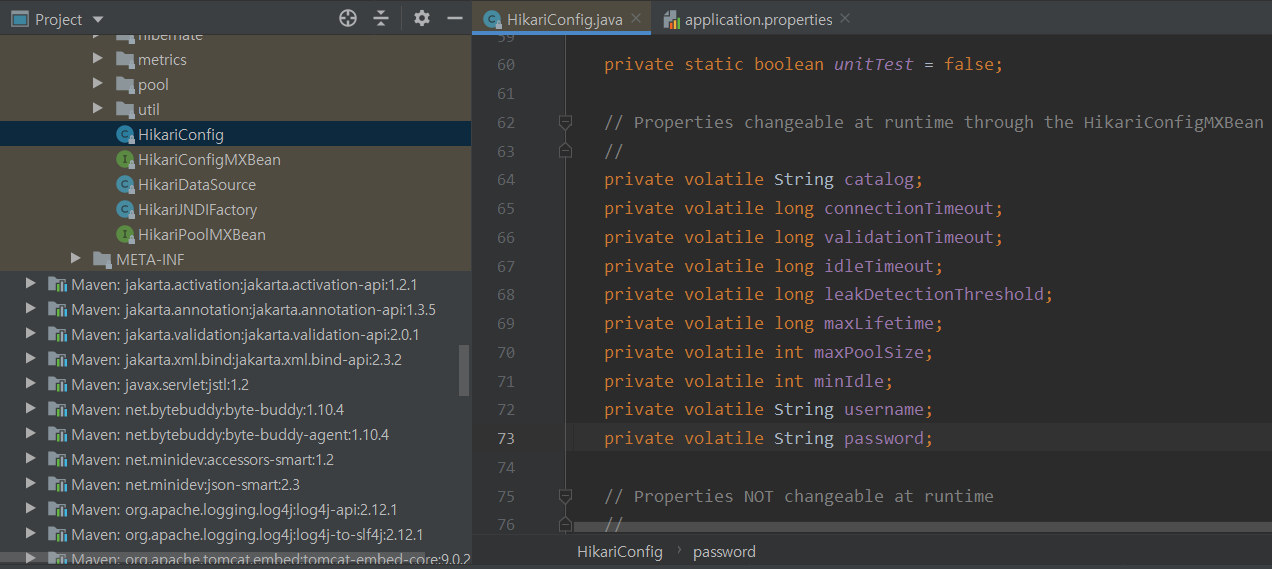
1) Spring Boot 2.0 이전 : Tomcat JDBC Connection Pool를 Default로 사용하였다. 2) Spring Boot 2.0 이후 : HikariCP를 Default로 사용하고 있다. 3) hikariCP github사이트에서는 매우 빠르고, 가볍고, 신뢰할 수 있다고 설명한다. 4) "zero-overhead" 엄청나게 높은 성능이라고 강조하며 tomcat, dbcp 등과의 성능 비교 결과도 첨부하고 있다.
◎ connectionTimeout (default : 30000(30초)) - 풀에서 커넥션을 얻어오기전까지 기다리는 최대 시간, 허용가능한 wait time을 초과시 SQLException이 발생한다. -설정가능한 최소 값 : 250
◎ validationTimeout (default : 5000(5초)) -valid 쿼리를 통해 커넥션이 유효한지 검사할 때 사용되는 timeout시간.(커넥션이 유효 검사 시 대기 시간을 지정) -이 값은 connectionTimeout보다 작아야 한다. -설정가능한 최소 값 : 250
◎ maximumPoolSize (default: 10) -풀에 유지시킬 수 있는 최대 커넥션 수. -풀의 커넥션 수가 옵션 값에 도달하게 되면 idle인 상태는 존재하지 않는다. -풀이 이 크기에 도달하고 유휴 커넥션이 없을 때 connectionTimeout이 지날 때까지 getConnection() 호출은 블록킹된다.
◎ idleTimeout (default : 600000(10분)) -pool에 일하지 않는 커넥션을 유지하는 시간. -이 옵션은 minimumIdle이 maximumPoolSize보다 작게 설정되어 있을 때만 적용된다. -이 옵션이 0이면 유휴 커넥션을 풀에서 제거하지 않는다. -설정가능한 최소 값 : 10000(10초)
◎ minimumIdle (default: same as maximumPoolSize) -유휴 커넥션의 최소 개수(아무런 일을 하지않아도 적어도 이 옵션 값의 size로 커넥션들을 유지해주는 설정이다.) -default값이 유동적이기 때문에 최적의 성능과 응답성을 생각하면 구지 설정하지 않는게 좋을 것 같다.
◎ maxLifetime (default : 1800000(30분)) -커넥션의 최대 유지 시간. 이 시간이 지난 커넥션 중에서 사용중인 커넥션은 종료된 이후에 풀에서 제거한다. -갑자기 풀에서 많은 커넥션이 제거되는 것을 피하기 위해 negative attenuation을 적용해 점진적으로 제거한다. -이 값이 0이면 풀에서 제거하지 않지만 idleTimeout은 적용된다.
◎ connectionTestQuery (default : 없음) -커넥션이 유효한지 검사할 때 사용할 쿼리를 지정한다.(보통 SELECT 1 로 설정 한다.) -드라이버가 JDBC4를 지원하면 이 프로퍼티를 설정하지 말자.(이 프로퍼티를 설정하지 않으면 JDBC4의 Conneciton.isValid()를 사용하여 유효성 검사 수행) -JDBC4 드라이버를 지원하지않는 환경에서 이 값을 설정하지 않는다면 error레벨 로그 리턴.
◎ leakDetectionThreshold -커넥션이 누수 로그메시지가 나오기 전에 커넥션을 검사하여 pool에서 커넥션을 내보낼 수 있는 시간 설정. -0으로 설정하면 누수 발견을 하지 않는다(leak detection 이용하지 않음). 허용하는 최소 값은 2000(2초)이다. -설정가능한 최소 값 : 2000(2초)
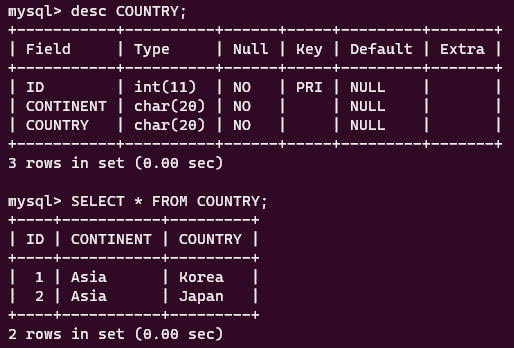
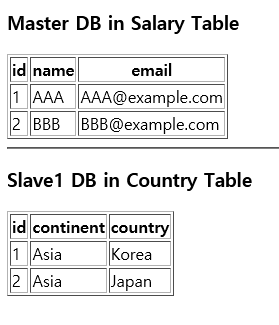
마스터와 슬레이브 DB에 아래의 쿼리문을 사용해 테이블 생성 및 테스트 데이터를 세팅해 주겠습니다.
구분의 용이를 위해 마스터 DB의 테이블은 SALARY, 슬레이브 DB는 COUNTRY로 종류를 구분해 주었습니다.
Master DataBase
# Master DataBase
mysql> CREATE DATABASE MASTER;
mysql> USE MASTER;
mysql> CREATE TABLE SALARY(ID INT NOT NULL PRIMARY KEY, NAME CHAR(10), EMAIL CHAR(20) NOT NULL);

mysql> INSERT INTO SALARY VALUES (1,'AAA','AAA@example.com');
mysql> INSERT INTO SALARY VALUES (2,'BBB','BBB@example.com');
mysql> FLUSH PRIVILEGES;
Master DB
위 사진과 같이 테이블이 세팅되었는지 확인합니다.
Slave DataBase
# Slave DataBase
mysql> CREATE DATABASE SLAVE;
mysql> USE SLAVE;
mysql> CREATE TABLE COUNTRY(ID INT NOT NULL PRIMARY KEY, CONTINENT CHAR(20), COUNTRY CHAR(20) NOT NULL);

mysql> INSERT INTO COUNTRY VALUES (1,'Asia','Korea');
mysql> INSERT INTO COUNTRY VALUES (2,'Asia','Japan');
mysql> FLUSH PRIVILEGES;
Slave DB
슬레이브 DB도 마찬가지로 적용 여부를 확인합니다.
2. application.properties 설정
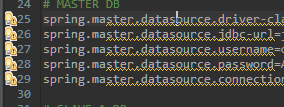
생성한 데이터베이스에 대한 정보를 Spring Boot의 application.properties 파일에 아래와 같이 작성합니다.
{user name}, {password} 부분은 각자 개인의 데이터베이스 계정 정보를 의미합니다.
슬레이브 DB 설정에서 slave-1이라는 이름으로 설정값을 주었는데, 이는 슬레이브 DB는 얼마든지 여러 개가 올 수 있고, 나중에라도 추가가 될 수 있는 DB이기 때문에 그때를 고려한 넘버링입니다. (ex slave-1, slave-2, slave-3)
이때, STS 환경이라면 DB 설정 정보에 노란색 밑줄로 정의되지 않은 이름이라고 경고를 띄워줄텐데, 올바르게 구성한 정보이므로 무시합니다.
3. Sql 세션 구성 정보 작성
이제, 각 데이터베이스의 설정 정보를 토대로 SqlSession을 생성하고 트랜젝션이 이루어지도록 구성 설정을 해 주어야 합니다.
간단하게 생각하면 application.properties에서 정의한 DB 연결 정보를 적용하고 그 DB와 상호작용하는 mapper 파일을 정의하는 내용을 작성하는 것입니다.
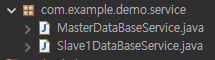
위 사진과 같이 com.example.demo 경로에 config라는 패키지를 생성하고 안에 각각 MasterDataBaseConfig.java, Slave1DataBaseConfig.java 파일을 생성합니다.
그리고 각 파일에 아래와 같이 작성합니다.
MasterDataBase.Config.java
package com.example.demo.config;

import javax.sql.DataSource;

import org.apache.ibatis.session.SqlSessionFactory;
import org.mybatis.spring.SqlSessionFactoryBean;
import org.mybatis.spring.SqlSessionTemplate;
import org.mybatis.spring.annotation.MapperScan;
import org.springframework.beans.factory.annotation.Qualifier;
import org.springframework.boot.context.properties.ConfigurationProperties;
import org.springframework.boot.jdbc.DataSourceBuilder;
import org.springframework.context.ApplicationContext;
import org.springframework.context.annotation.Bean;
import org.springframework.context.annotation.Configuration;
import org.springframework.context.annotation.Primary;
import org.springframework.transaction.annotation.EnableTransactionManagement;

@Configuration
@MapperScan(value="com.example.demo.mapper.master", sqlSessionFactoryRef="masterSqlSessionFactory")
@EnableTransactionManagement
public class MasterDataBaseConfig {

	@Primary
	@Bean(name="masterDataSource")
	@ConfigurationProperties(prefix="spring.master.datasource")
	public DataSource masterDataSource() {
		//application.properties에서 정의한 DB 연결 정보를 빌드
		return DataSourceBuilder.create().build();
	}

	@Primary
	@Bean(name="masterSqlSessionFactory")
	public SqlSessionFactory masterSqlSessionFactory(@Qualifier("masterDataSource") DataSource masterDataSource, ApplicationContext applicationContext) throws Exception{
		//세션 생성 시, 빌드된 DataSource를 세팅하고 SQL문을 관리할 mapper.xml의 경로를 알려준다.
		SqlSessionFactoryBean sqlSessionFactoryBean = new SqlSessionFactoryBean();
		sqlSessionFactoryBean.setDataSource(masterDataSource);
		sqlSessionFactoryBean.setMapperLocations(applicationContext.getResources("classpath:com/example/demo/mybatis/master/*.xml"));
		return sqlSessionFactoryBean.getObject();
	}

	@Primary
	@Bean(name="masterSqlSessionTemplate")
	public SqlSessionTemplate masterSqlSessionTemplate(SqlSessionFactory masterSqlSessionFactory) throws Exception{
		return new SqlSessionTemplate(masterSqlSessionFactory);
	}

}
Slave1DataBaseConfig.java
package com.example.demo.config;

import javax.sql.DataSource;

import org.apache.ibatis.session.SqlSessionFactory;
import org.mybatis.spring.SqlSessionFactoryBean;
import org.mybatis.spring.SqlSessionTemplate;
import org.mybatis.spring.annotation.MapperScan;
import org.springframework.beans.factory.annotation.Qualifier;
import org.springframework.boot.context.properties.ConfigurationProperties;
import org.springframework.boot.jdbc.DataSourceBuilder;
import org.springframework.context.ApplicationContext;
import org.springframework.context.annotation.Bean;
import org.springframework.context.annotation.Configuration;
import org.springframework.transaction.annotation.EnableTransactionManagement;

@Configuration
@MapperScan(value="com.example.demo.mapper.slave1", sqlSessionFactoryRef="slave1SqlSessionFactory")
@EnableTransactionManagement
public class Slave1DataBaseConfig {

	@Bean(name="slave1DataSource")
	@ConfigurationProperties(prefix="spring.slave-1.datasource")
	public DataSource masterDataSource() {
		//application.properties에서 정의한 DB 연결 정보를 빌드
		return DataSourceBuilder.create().build();
	}

	@Bean(name="slave1SqlSessionFactory")
	public SqlSessionFactory slave1SqlSessionFactory(@Qualifier("slave1DataSource") DataSource slave1DataSource, ApplicationContext applicationContext) throws Exception{
		//세션 생성 시, 빌드된 DataSource를 세팅하고 SQL문을 관리할 mapper.xml의 경로를 알려준다.
		SqlSessionFactoryBean sqlSessionFactoryBean = new SqlSessionFactoryBean();
		sqlSessionFactoryBean.setDataSource(slave1DataSource);
		sqlSessionFactoryBean.setMapperLocations(applicationContext.getResources("classpath:com/example/demo/mybatis/slave1/*.xml"));
		return sqlSessionFactoryBean.getObject();
	}

	@Bean(name="slave1SqlSessionTemplate")
	public SqlSessionTemplate slave1SqlSessionTemplate(SqlSessionFactory slave1SqlSessionFactory) throws Exception{
		return new SqlSessionTemplate(slave1SqlSessionFactory);
	}

}
import 된 객체들을 확인하고 적용해 줍니다.
그리고 각 어노테이션에서 정의한 Ref와 name 정보를 꼼꼼하게 확인해 주어야 합니다.
대부분의 에러의 원인은 이 Config 파일에서 발생합니다.
MasterDataBaseConfig와 내용이 겹치면 안 되며, 각 어노테이션에서 참조하는 name과 각 메서드의 이름이 일치하는지 잘 확인합니다.
사실 이 작업이 완료되었다면 본 포스팅에서 목적한 바의 절반은 완료된 것입니다.
이제는 이 구성 스크립트에서 정의한 대로 올바른 경로에 올바른 이름으로 나머지 필요 파일들을 생성해 주어야 합니다.
4. 각 테이블에 대응할 Model 객체 정의
데이터베이스의 테이블 정보를 받을 수 있는 Model 객체를 정의하겠습니다.
com.example.demo 패키지에 model 패키지를 생성합니다.
그리고 마스터 DB의 Salary 테이블 정보를 받을 SalaryModel.java와 슬레이브 DB의 Country 테이블을 받을 CountryModel.java 파일을 생성하고 아래와 같이 정의합니다.
본 예제에서는 lombok을 사용했는데, 만약 lombok을 사용하지 않는 환경이라면 getter/setter 메서드를 각각 정의해줍니다.
SalaryModel.java - master
//SalaryModel.java

package com.example.demo.model;

import lombok.Builder;
import lombok.Data;
import lombok.NonNull;

@Builder
@Data
public class SalaryModel {
	private int id;
	@NonNull @Builder.Default private String name = "NULL NAME";
	@NonNull @Builder.Default private String email = "NULL EMAIL";
}
CountryModel.java - slave 1
// CountryModel.java

package com.example.demo.model;

import lombok.Builder;
import lombok.Data;
import lombok.NonNull;

@Builder @Data
public class CountryModel {
	private int id;
	@NonNull @Builder.Default private String continent = "No CONTINENT";
	@NonNull @Builder.Default private String country = "No Country";
}
5. Mapper 인터페이스 정의
이제, 쿼리문 요청하기 직전 단계인 Mapper 인터페이스를 정의합니다.
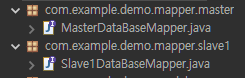
Mapper 인터페이스는 Config.java에서 MapperScan 어노테이션을 통해 각자 별도의 패키지에서 탐색하도록 정의했으므로 패키지를 각각 생성해야 합니다.
com.example.demo에 공통으로 사용할 mapper 패키지를 생성하고 그 안에 master, slave1 패키지를 추가로 생성합니다.
그리고 master 패키지 안에는 MasterDataBaseMapper.java 파일을, slave1 패키지 안에는 Slave1DataBaseMapper.java 파일을 생성합니다.
그리고 각 파일에 아래와 같이 내용을 작성합니다.
MasterDataBaseMapper.java
// MasterDataBaseMapper.java

package com.example.demo.mapper.master;

import java.util.List;

import com.example.demo.model.SalaryModel;

public interface MasterDataBaseMapper {
	public List<SalaryModel> getSalary() throws Exception;
}
Slave1DataBaseMapper.java
// Slave1DataBaseMapper.java

package com.example.demo.mapper.slave1;

import java.util.List;

import com.example.demo.model.CountryModel;

public interface Slave1DataBaseMapper {
	public List<CountryModel> getCountry() throws Exception;
}
위 파일들은 config.java에서 @MapperScan을 통해 mapper 파일의 위치를 알려주었으므로 @Repository @Mapper 어노테이션을 붙여줄 필요가 없습니다.
각 mapper 파일에는 DB에 있는 정보들을 조회하는 간단한 메서드만 정의해 주었습니다.
6. 각 테이블의 Mapper xml파일 정의
이제, 각 테이블에 요청할 쿼리문을 관리할 xml 파일을 생성해 주어야 합니다.
이 xml 파일도 데이터베이스 별로 패키지를 나누어 줍니다.
거듭 언급하지만 생성하는 패키지 경로는confg.java에서 정의한 대로 생성해야 합니다.
mapper 인터페이스와 구분을 주기 위해 xml 파일들의 패키지는 mybatis를 상위 패키지로, master, slave1 패키지를 하위로 구성하고 master에는 MasterDataBaseMapper.xml 파일을, slave1에는 Slave1DataBaseMapper.xml을 생성합니다.
As well as REST web services, you can also use Spring MVC to serve dynamic HTML content. Spring MVC supports a variety of templating technologies, including Thymeleaf, FreeMarker, and JSPs. Also, many other templating engines include their own Spring MVC integrations.
Spring Boot includes auto-configuration support for the following templating engines: FreeMarker, Groovy, Thymeleaf, Mustache
If possible, JSPs should be avoided. There are several known limitations when using them with embedded servlet containers.
7.4.5. JSP Limitations When running a Spring Boot application that uses an embedded servlet container (and is packaged as an executable archive), there are some limitations in the JSP support.
With Jetty and Tomcat, it should work if you use war packaging. An executable war will work when launched with java -jar, and will also be deployable to any standard container. JSPs are not supported when using an executable jar. Undertow does not support JSPs. Creating a custom error.jsp page does not override the default view for error handling. Custom error pages should be used instead.
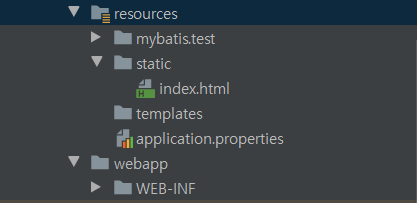
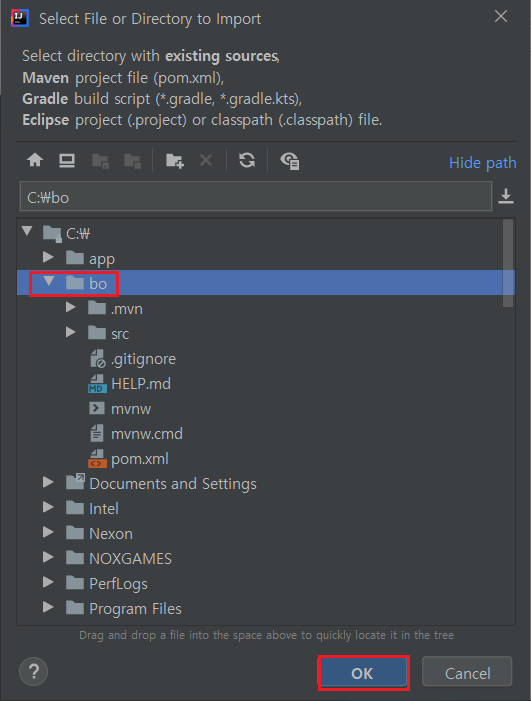
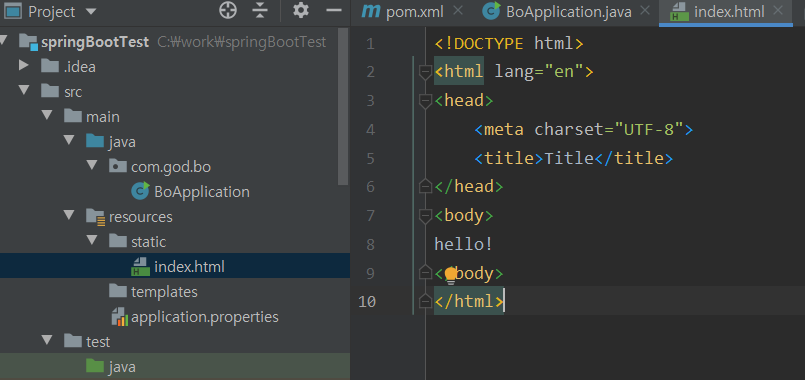
※ 앞서 포스팅에서 기본 프로젝트 구조를 잡았을 것이다 src > main > reousrce >[static] 폴더엔 정적 리소스들을 추가하였을 것이다. src > main > reousrce >[templates]폴더도 확인할 수 있을 것인데 Thymeleaf(.html), Velocity(.vm)등과 관련된 파일만 동작하고 jsp 파일은 추가하여도 작동하지 않으니 참고 하자.
※ 폴더 구조
src └─ main └─ resource └─ templates (View: Thymeleaf, Groovy, Velocity 등) └─ static (정적 컨텐츠 : html, css, js, image 등)
▶ 내장 Tomcat
- 스프링부트는 웹 개발을 위해 자주 사용되는 Spring의 Component들과 Tomcat, Jetty 등의 경량 웹 어플리케이션 서버를 통합한 경량의 웹개발 프레임 워크이다.
- 즉 별도의 웹 어플리케이션 서버 없이 SpringBoot를 통해 프레임워크와 웹 어플리케이션 서버를 통합했다고 생각하면 된다.
앞서 포스팅에서 다음 디펜던시(spring-boot-starter-web)를 추가 하였을 것이다.
※ Spring 애플리케이션 시작시 application.properties 파일에 정의된 내용을 로드한다. (스프링부트의 AutoConfiguration을 통해 자동 설정한 속성값들이 존재하며, application.properties의 해당 값들은 오버라이드 한다.)
▶ server.port
- 별다른 설정을 하지 않으면 default 포트는 8080이다. - Spring Boot에 기본적으로 내장되어있는 Tomcat과 Jetty와 같은 WAS의 포트번호를 임의로 변경 할 수 있다.
server.port = 8888
▶ prefix/suffix
- jsp 페이지를 처리하기 위한 prefix와 suffix를 application.properties에 추가 하자. - 앞서 생성한 JSP 경로를 prefix로 선언, 그리고 확장자럴 suffix로 선언할 수 있다.
#JSP와 같이 사용할 경우 뷰 구분을 위해 컨트롤러가 뷰 이름을 반환할때 thymeleaf/ 로 시작하면 타임리프로 처리하도록 view-names 지정
spring.thymeleaf.view-names=thymeleaf/*
spring.thymeleaf.prefix=classpath:/templates/
spring.thymeleaf.suffix=.html
#thymeleaf를 사용하다 수정 사항이 생길 때 수정을 하면 재시작을 해줘야 한다. 이를 무시하고 브라우저 새로고침시 수정사항 반영을 취해 cache=false 설정(운영시는 true)
spring.thymeleaf.cache=false
spring.thymeleaf.check-template-location=true
▶Vo 설정
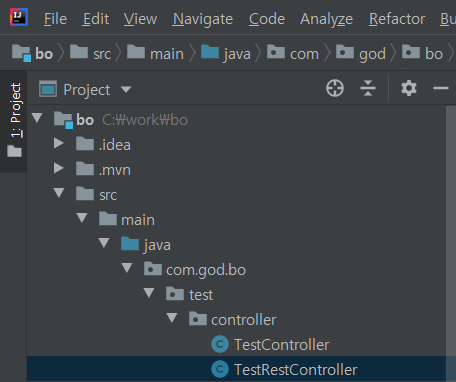
package com.god.bo.test.vo;
public class TestVo {
private Long mbrNo;
private String id;
private String name;
public TestVo() {
}
public TestVo(String id, String name) {
this.id = id;
this.name = name;
}
public Long getMbrNo() {
return mbrNo;
}
public void setMbrNo(Long mbrNo) {
this.mbrNo = mbrNo;
}
public String getId() {
return id;
}
public void setId(String id) {
this.id = id;
}
public String getName() {
return name;
}
public void setName(String name) {
this.name = name;
}
}
▶Controller 설정
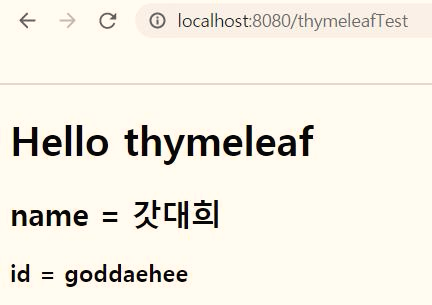
@RequestMapping("/thymeleafTest")
public String thymeleafTest(Model model) {
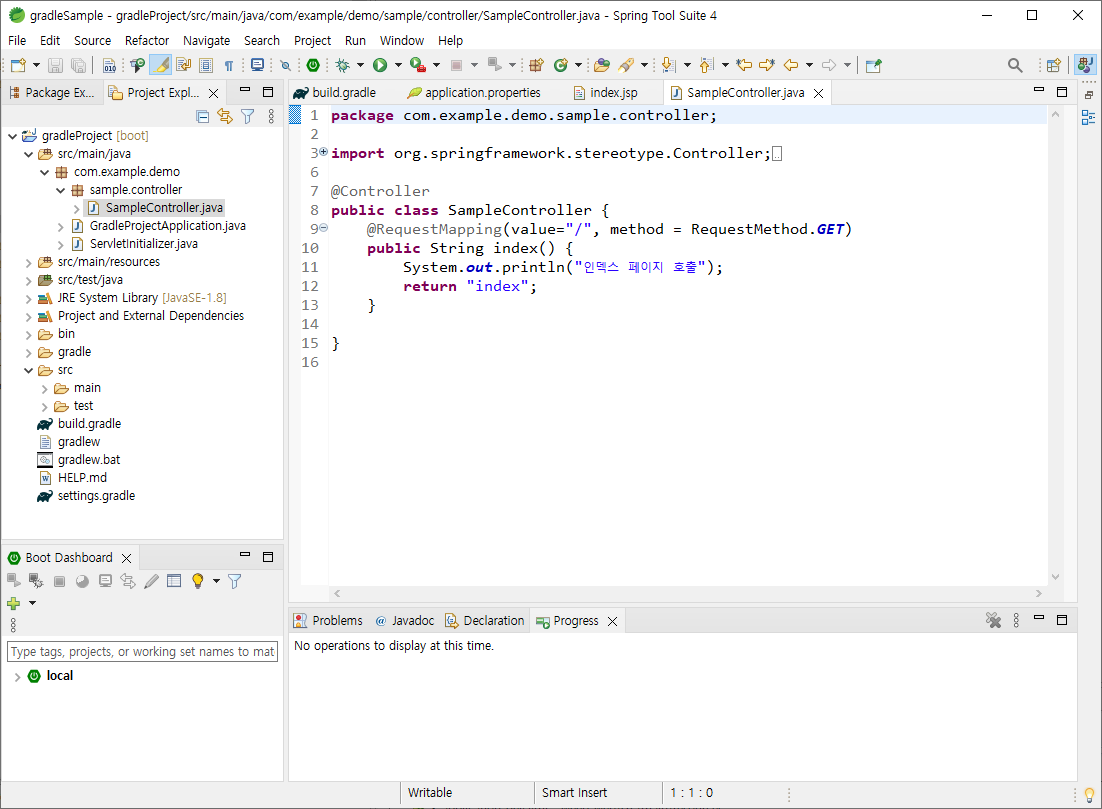
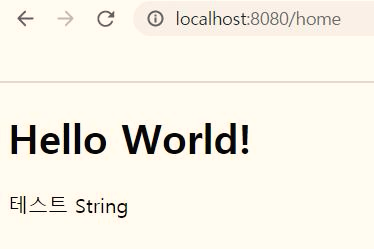
TestVo testModel = new TestVo("goddaehee", "갓대희") ;
model.addAttribute("testModel", testModel);
return "thymeleaf/thymeleafTest";
}
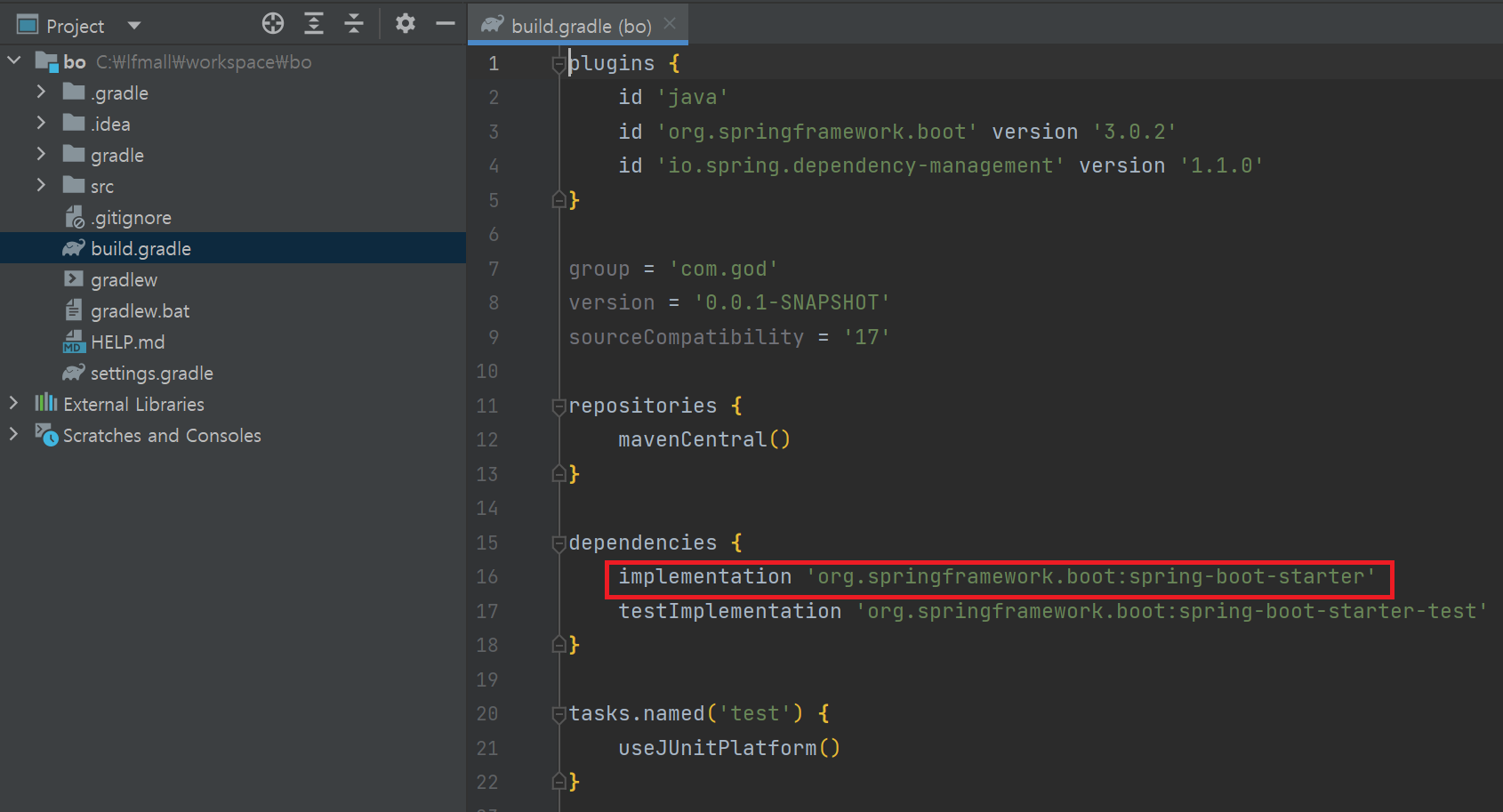
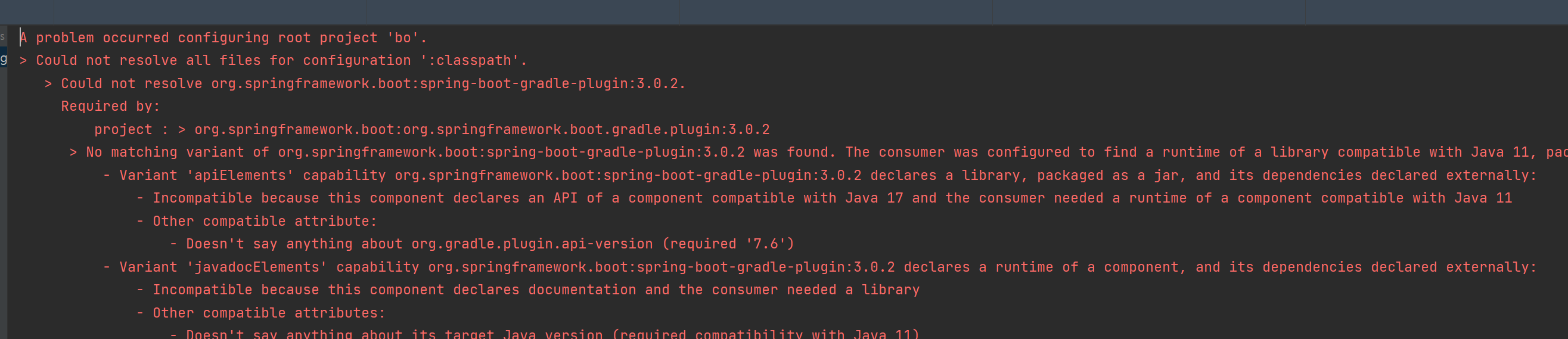
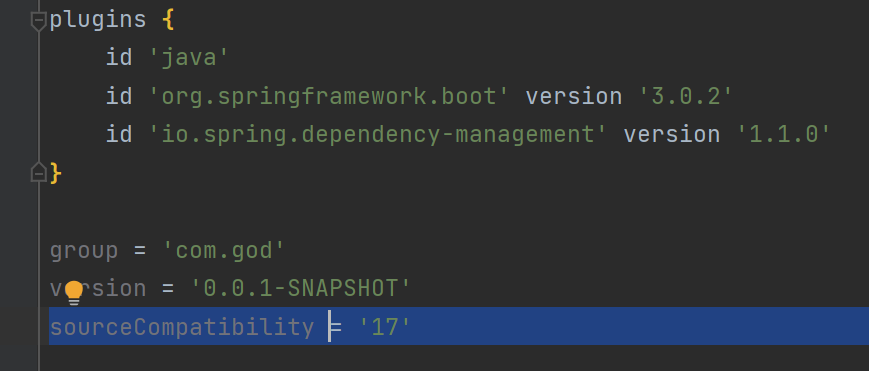
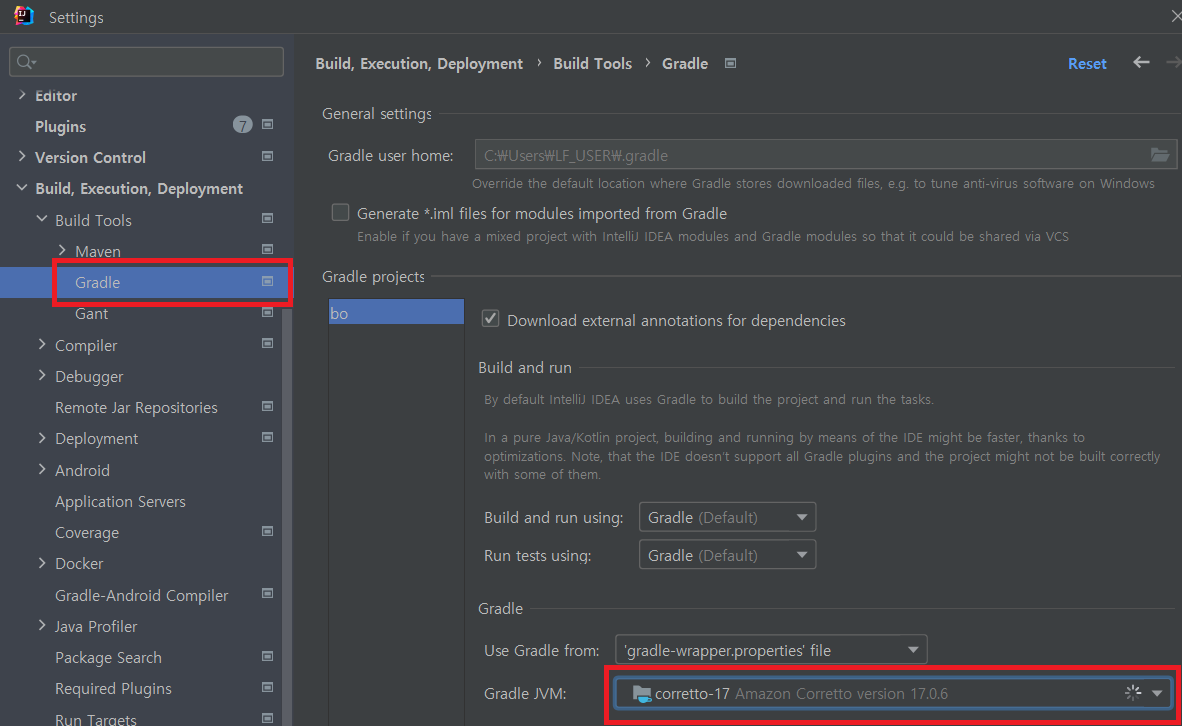
- No matching variant of org.springframework.boot:spring-boot-gradle-plugin:3.0.x was found
- java version이 맞지 않는 경우이다.
A problem occurred configuring root project 'bo'.
> Could not resolve all files for configuration ':classpath'.
> Could not resolve org.springframework.boot:spring-boot-gradle-plugin:3.0.2.
Required by:
project : > org.springframework.boot:org.springframework.boot.gradle.plugin:3.0.2
> No matching variant of org.springframework.boot:spring-boot-gradle-plugin:3.0.2 was found. The consumer was configured to find a runtime of a library compatible with Java 11, packaged as a jar, and its dependencies declared externally, as well as attribute 'org.gradle.plugin.api-version' with value '7.6' but:
- Variant 'apiElements' capability org.springframework.boot:spring-boot-gradle-plugin:3.0.2 declares a library, packaged as a jar, and its dependencies declared externally:
- Incompatible because this component declares an API of a component compatible with Java 17 and the consumer needed a runtime of a component compatible with Java 11
- Other compatible attribute:
- Doesn't say anything about org.gradle.plugin.api-version (required '7.6')
- Variant 'javadocElements' capability org.springframework.boot:spring-boot-gradle-plugin:3.0.2 declares a runtime of a component, and its dependencies declared externally:
- Incompatible because this component declares documentation and the consumer needed a library
- Other compatible attributes:
- Doesn't say anything about its target Java version (required compatibility with Java 11)
- Doesn't say anything about its elements (required them packaged as a jar)
- Doesn't say anything about org.gradle.plugin.api-version (required '7.6')
- Variant 'mavenOptionalApiElements' capability org.springframework.boot:spring-boot-gradle-plugin-maven-optional:3.0.2 declares a library, packaged as a jar, and its dependencies declared externally:
- Incompatible because this component declares an API of a component compatible with Java 17 and the consumer needed a runtime of a component compatible with Java 11
- Other compatible attribute:
- Doesn't say anything about org.gradle.plugin.api-version (required '7.6')
- Variant 'mavenOptionalRuntimeElements' capability org.springframework.boot:spring-boot-gradle-plugin-maven-optional:3.0.2 declares a runtime of a library, packaged as a jar, and its dependencies declared externally:
- Incompatible because this component declares a component compatible with Java 17 and the consumer needed a component compatible with Java 11
- Other compatible attribute:
- Doesn't say anything about org.gradle.plugin.api-version (required '7.6')
- Variant 'runtimeElements' capability org.springframework.boot:spring-boot-gradle-plugin:3.0.2 declares a runtime of a library, packaged as a jar, and its dependencies declared externally:
- Incompatible because this component declares a component compatible with Java 17 and the consumer needed a component compatible with Java 11
- Other compatible attribute:
- Doesn't say anything about org.gradle.plugin.api-version (required '7.6')
- Variant 'sourcesElements' capability org.springframework.boot:spring-boot-gradle-plugin:3.0.2 declares a runtime of a component, and its dependencies declared externally:
- Incompatible because this component declares documentation and the consumer needed a library
- Other compatible attributes:
- Doesn't say anything about its target Java version (required compatibility with Java 11)
- Doesn't say anything about its elements (required them packaged as a jar)
- Doesn't say anything about org.gradle.plugin.api-version (required '7.6')
* Try:
> Run with --info or --debug option to get more log output.
> Run with --scan to get full insights.
- Java Version을 17 미만으로 사용하고 싶은 경우는 스프링 부트 3.0 미만으로 다운그레이드 하여 한시적으로 사용 가능할 것이다.
일단 프로젝트에 필요한 최소한의 폼 설정으로 진행하고자 다음과 같이 최종적으로 폼 설정을 정리 하였다.
<?xml version="1.0" encoding="UTF-8"?>
<project xmlns="http://maven.apache.org/POM/4.0.0" xmlns:xsi="http://www.w3.org/2001/XMLSchema-instance"
xsi:schemaLocation="http://maven.apache.org/POM/4.0.0 https://maven.apache.org/xsd/maven-4.0.0.xsd">
<modelVersion>4.0.0</modelVersion> <!--POM model의 버전-->
<parent> <!--프로젝트의 계층 정보-->
<groupId>org.springframework.boot</groupId>
<artifactId>spring-boot-starter-parent</artifactId>
<version>2.2.6.RELEASE</version>
<relativePath/> <!-- lookup parent from repository -->
</parent>
<groupId>com.god</groupId> <!--프로젝트를 생성하는 조직의 고유 아이디를 결정한다. 일반적으로 도메인 이름을 거꾸로 적는다.-->
<artifactId>bo</artifactId> <!--프로젝트 빌드시 파일 대표이름 이다. groupId 내에서 유일해야 한다.Maven을 이용하여 빌드시 다음과 같은 규칙으로 파일이 생성 된다.
artifactid-version.packaging. 위 예의 경우 빌드할 경우 bo-0.0.1-SNAPSHOT.war 파일이 생성된다.-->
<version>0.0.1-SNAPSHOT</version> <!--프로젝트의 현재 버전, 프로젝트 개발 중일 때는 SNAPSHOT을 접미사로 사용-->
<packaging>war</packaging> <!--패키징 유형(jar, war, ear 등)-->
<name>bo</name> <!--프로젝트, 프로젝트 이름-->
<description>Demo project for Spring Boot</description> <!--프로젝트에 대한 간략한 설명-->
<url>http://goddaehee.tistory.com</url> <!--프로젝트에 대한 참고 Reference 사이트-->
<properties>
<!-- 버전관리시 용이 하다. ex) 하당 자바 버전을 선언 하고 dependencies에서 다음과 같이 활용 가능 하다.
<version>${java.version}</version> -->
<java.version>1.8</java.version>
</properties>
<dependencies> <!--dependencies태그 안에는 프로젝트와 의존 관계에 있는 라이브러리들을 관리 한다.-->
<dependency>
	<groupId>org.springframework.boot</groupId>
	<artifactId>spring-boot-starter-web</artifactId>
</dependency>
<dependency>
<groupId>org.springframework.boot</groupId>
<artifactId>spring-boot-starter-test</artifactId>
<scope>test</scope>
<exclusions>
<exclusion>
<groupId>org.junit.vintage</groupId>
<artifactId>junit-vintage-engine</artifactId>
</exclusion>
</exclusions>
</dependency>
</dependencies>
<build> <!--빌드에 사용할 플러그인 목록-->
<plugins>
<plugin>
<groupId>org.springframework.boot</groupId>
<artifactId>spring-boot-maven-plugin</artifactId>
</plugin>
</plugins>
</build>
</project>
This will launch a total of 5 processes on your system: three JBoss AS server instances; a Domain Controller process that acts as a central management point for all servers that belong to the same "domain"; and a lightweight Process Controller process that is responsible for spawning the other 4 processes and monitoring their lifecycle.
If you want to work in standalone mode, open a terminal and cd into the distribution's bin directory, and run the "standalone" launch script:
The "--connect" by default connects to localhost at port 9999 and triggers the shutdown. If your server doesn't use the default port or isn't bound to localhost, then you can explicitly specify the host port combination to the --connect as follows:
res.setContentType("text/html; charset=UTF-8"); PrintWriter out = res.getWriter(); if(resultImg.equals("good")) { code=0; }else if (resultImg.equals("badwidth")) { out.println("<script language='javascript'>"); out.println("alert('이미지 가로 비율이 맞지 않습니다. px사이즈 확인후 다시 업로드해 주십시요')"); out.println("</script>"); out.flush(); code=1; }else if (resultImg.equals("badheight")) { out.println("<script language='javascript'>"); out.println("alert('이미지세로 비율이 맞지 않습니다. px사이즈 확인후 다시 업로드해 주십시요')"); out.println("</script>"); out.flush(); code=2; }
//설정된 기준값과 어로드 받은 파일의 가로세로 값의 비율이 같은지 비교 public String setImageSize(double width1,double height1,double setwidth,double setheight){ String Result="good";
double result=0; if(width1>height1) { result = (setheight * width1) /height1; log.debug("width1 > height1 = result : "+result); if(result < (setwidth - 30) || result > (setwidth+30)) { Result ="badwidth"; } }else { result = (setwidth * height1) /width1; if(result < (setheight - 30) || result > (setheight+30)) { Result ="badheight"; } } return Result; }
String resultImg = setImageSize(width1,height1,setwidth,setheight);

		log.debug("resultImg : "+resultImg);

		res.setContentType("text/html; charset=UTF-8");
	PrintWriter out = res.getWriter();
		if(resultImg.equals("good")) {
			code=0;
		}else if (resultImg.equals("badwidth")) {
			  out.println("<script language='javascript'>");
	out.println("alert('이미지 가로 비율이  맞지 않습니다. px사이즈 확인후 다시 업로드해 주십시요')");
	out.println("</script>");
	out.flush();
	code=1;
		}else if (resultImg.equals("badheight")) {
	out.println("<script language='javascript'>");
	out.println("alert('이미지세로 비율이  맞지 않습니다. px사이즈 확인후 다시 업로드해 주십시요')");
	out.println("</script>");
	out.flush();
	code=2;
		}


	//설정된 기준값과 어로드 받은 파일의 가로세로 값의 비율이 같은지 비교
	public String setImageSize(double width1,double height1,double setwidth,double setheight){
            			   String Result="good";

            			   double result=0;
            			   if(width1>height1) {
                               result =  (setheight * width1) /height1;
                               log.debug("width1 > height1 = result : "+result);
	                               if(result < (setwidth - 30) || result > (setwidth+30)) {
	                                Result ="badwidth";
	                               }
                            }else {
                               result =  (setwidth * height1) /width1;
                               if(result < (setheight - 30) || result > (setheight+30)) {
                            	   Result ="badheight";
                               }
                         }
            			return Result;
            		}